


Imagine a world where you never have to worry about the safety and security of your home, even when you’re miles away. With the advancements in technology, it is now possible to protect your home with the help of WiFi hidden cameras. These tiny, inconspicuous devices offer a discreet and hassle-free way to monitor your surroundings, giving you peace of mind and a sense of control over your living space. In this article, we’ll explore the benefits of using WiFi hidden cameras to secure your home, providing you with essential tips on how to choose the right cameras and effectively set them up. So, say goodbye to constant worrying and hello to a safer and more secure home environment with WiFi hidden cameras!

This image is property of thespystore.com.au.


Choosing the Right WiFi Hidden Camera
When it comes to choosing the right WiFi hidden camera for your home, it’s important to consider your surveillance needs. Think about why you want a hidden camera in the first place. Are you trying to monitor your home for security reasons? Are you concerned about the safety of your children or elderly occupants? Once you determine your specific requirements, you can narrow down the options available.
Next, evaluate the features that each camera offers. Do you want a camera that can rotate or pan, giving you a wider field of view? Are you looking for one with motion detection capabilities or night vision? These features can greatly enhance the effectiveness of your surveillance system, so it’s crucial to choose a camera that suits your needs.
Another important factor to consider is the camera’s resolution. A higher resolution camera will provide clearer and more detailed footage, while a lower resolution may result in blurry or pixelated images. Keep in mind that higher resolution cameras may also require more storage space for the recorded footage.
Before making a final decision, ensure that the WiFi hidden camera you choose is compatible with your home network. Check for compatibility with your WiFi router and ensure that the camera can connect to the network without any compatibility issues. This will ensure a seamless integration of the camera into your existing system.
Additionally, consider the storage options available with the WiFi hidden camera. Some cameras offer built-in storage, while others require an external storage device such as a microSD card or a cloud storage service. Choose a camera that offers a storage option suitable for your needs and preferences.
Setting Up WiFi Hidden Cameras
Once you have chosen the right WiFi hidden camera for your home, it’s time to set it up. Begin by locating the optimal positions for the cameras. Consider areas that need monitoring, such as entry points or key areas inside and outside your home. Ensure that the cameras are hidden but have a clear view of the areas you want to monitor.
Next, connect the camera to a power source. Most WiFi hidden cameras need to be plugged into a power outlet to function properly. Make sure the camera is securely connected to the power source, ensuring uninterrupted operation.
After connecting the camera to power, you need to connect it to your home WiFi network. Follow the manufacturer’s instructions to connect the camera to your network. This usually involves entering your network’s name and password into the camera’s settings.
To ensure everything is working correctly, it’s important to test the camera’s functionality. Check if you can access the camera’s live feed from your smartphone or computer. Test the motion detection and other features to make sure they are working as expected.
Finally, once you have set up your WiFi hidden cameras, it’s crucial to secure their access and control. Change the default login credentials for the camera’s settings to prevent unauthorized access. Use strong, unique passwords and enable two-factor authentication if available. Regularly update the camera’s firmware to ensure that it has the latest security patches.
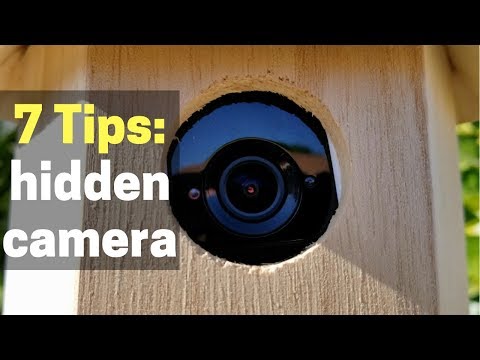
Using Mobile Apps for Monitoring
One of the major advantages of WiFi hidden cameras is the ability to monitor your home remotely using mobile apps. To make the most of this feature, it’s important to select a reliable monitoring app. Look for apps that are highly rated and have positive reviews from other users. Read the app’s description and features to ensure it meets your specific requirements.
Once you have chosen a monitoring app, you need to connect your cameras to the app. Follow the app’s instructions to add your cameras to the system. This typically involves scanning a QR code or entering a unique identifier for each camera.
To stay informed about any activity in your home, enable push notifications for alerts. This way, you will receive real-time notifications on your smartphone whenever the cameras detect motion or any other triggers you set up. Push notifications help you stay vigilant even when you’re not actively monitoring the live feed.
Configure the motion detection settings in the app to suit your needs. You can adjust the sensitivity level to avoid false alarms caused by minor movements. Experiment with different settings until you find the right balance between notifications and accurate detection of relevant events.
One of the key benefits of WiFi hidden cameras is the ability to access recorded footage remotely. With the monitoring app, you can view and download recorded footage from your smartphone or computer, even when you’re away from home. This can be valuable if you need evidence for incidents or if you simply want to review footage for security purposes.
Maximizing Home Security with WiFi Hidden Cameras
WiFi hidden cameras can play a crucial role in maximizing your home security. By strategically installing cameras at vulnerable entry points, such as doors and windows, you can effectively deter burglars and trespassers. The presence of cameras alone can act as a strong deterrent, as burglars are less likely to target homes with visible security measures.
In addition to monitoring entry points, it’s important to place cameras in key areas both inside and outside your home. High-traffic areas such as living rooms, hallways, and outdoor spaces should be covered to ensure comprehensive surveillance. This will enable you to track any suspicious activity and respond promptly if necessary.
When selecting WiFi hidden cameras, consider those with night vision capability. These cameras use infrared technology to capture clear footage even in low-light conditions. This is particularly important for outdoor surveillance, as criminals often target homes under the cover of darkness.
Some WiFi hidden cameras also offer two-way audio functionality, allowing you to communicate with individuals on the other side of the camera. This can be useful for interacting with delivery personnel, providing instructions to household staff, or even deterring potential intruders.
For enhanced home security, consider integrating your WiFi hidden cameras with other security devices. This could include a security alarm system, smart locks, or even a video doorbell. Integrating these devices allows for a more holistic approach to home security and can provide you with a comprehensive view of your home’s security status.


This image is property of Amazon.com.
Maintaining Privacy and Legal Compliance
While WiFi hidden cameras can greatly enhance your home security, it’s important to maintain privacy and comply with legal requirements. Informing household members about the presence of cameras is essential to ensure their privacy rights are respected. Open communication helps avoid any feelings of secrecy or violation.
When installing the cameras, make sure they are placed only in non-private areas. Avoid installing them in bedrooms, bathrooms, or any other areas where individuals have a reasonable expectation of privacy. This will help strike the right balance between security and privacy.
Take the time to familiarize yourself with the privacy laws in your jurisdiction. Different countries, states, and even cities may have varying regulations regarding the use of surveillance cameras. Ensure that you are in compliance with these laws to avoid any legal issues.
To further protect the privacy of individuals in your home, avoid capturing audio recordings with your WiFi hidden cameras. Unless you have explicit consent from the individuals being recorded, it’s best to disable any audio recording features to respect their privacy rights.
Finally, it’s important to secure the camera feeds from unauthorized access. Change the default login credentials for the camera’s settings, as mentioned earlier, and ensure that the video feeds are encrypted. Using strong encryption protocols will prevent potential hackers from intercepting and accessing the camera feeds.
Optimizing WiFi Hidden Camera Performance
To maximize the performance of your WiFi hidden camera, there are a few key factors to consider. Ensuring sufficient WiFi signal strength is crucial for reliable camera connectivity. Place your WiFi router in a central location and avoid blocking its signal with walls or other obstacles. If needed, consider using WiFi range extenders to improve coverage in areas where the cameras are located.
Regularly check the connectivity of your cameras to ensure they are functioning properly. If you notice any issues, troubleshoot the problems by restarting the camera or checking the WiFi connection. Keeping an eye on the camera’s connectivity will help maintain its reliability and effectiveness.
Updating the camera’s firmware is another important aspect of optimizing performance. Manufacturers regularly release firmware updates that address security vulnerabilities, improve features, and enhance overall functionality. Check for firmware updates periodically and apply them to keep your cameras up to date.
Changing the default login credentials is important not only for security purposes but also for optimizing performance. Using strong, unique passwords will prevent unauthorized access and potential control of your cameras by malicious actors. Additionally, it’s a good practice to periodically change your WiFi network passwords to maintain optimal security.
When it comes to camera feeds, using strong encryption protocols is imperative. Encryption ensures that the video footage transmitted from the camera to your device cannot be intercepted or viewed by unauthorized individuals. Look for cameras that support encryption protocols such as WPA2 or WPA3 for secure transmission.


This image is property of Amazon.com.
Troubleshooting and Maintenance
While WiFi hidden cameras are generally reliable, occasional issues may arise. Identifying and resolving common connectivity issues is important to maintain uninterrupted surveillance. Common issues could include a camera losing connection to the WiFi network, poor video quality, or intermittent live feed. Consult the camera’s user manual or contact the manufacturer’s customer support for assistance in troubleshooting these issues.
Routine maintenance is also essential to keep your cameras functioning optimally. Regularly clean the camera lenses to avoid any dust or debris that may affect the clarity of the video footage. Check the camera’s power source and cables for any signs of damage, and replace them if necessary. By regularly inspecting and maintaining your cameras, you can extend their lifespan and ensure reliable performance.
Monitoring the health and performance of your cameras is important to catch any potential issues early on. Use the monitoring app or software provided by the manufacturer to check camera status, connectivity, and any other information related to their operation. This proactive approach allows for timely detection and resolution of any camera-related issues.
Backup and storage of recorded footage is a critical aspect of camera maintenance. Regularly back up the recorded footage to avoid the risk of data loss in case of device failure or other unforeseen circumstances. Use external storage devices or cloud storage services to securely store the footage for future reference.
If you encounter any difficulties in setting up or maintaining your WiFi hidden cameras, don’t hesitate to seek professional assistance. Many manufacturers or security companies offer installation and support services, which can be valuable for complex setups or for those who want peace of mind knowing their system is properly installed and maintained.
Benefits of WiFi Hidden Cameras
Investing in WiFi hidden cameras offers numerous benefits for home security. By strategically placing cameras in and around your home, you can effectively deter potential burglars and trespassers. The mere presence of cameras can act as a strong deterrent, preventing criminals from targeting your property.
WiFi hidden cameras allow you to monitor and protect your children or elderly occupants. Whether you want to keep an eye on your children while you’re away at work or ensure the safety of elderly family members, WiFi hidden cameras provide a convenient solution. You can check the live feed at any time and set up alerts for certain activities.
Supervising household staff or contractors becomes easier with WiFi hidden cameras. Whether you have a nanny, housekeeper, or other personnel working in your home, cameras can provide peace of mind. By monitoring their activities, you can ensure that they are following your instructions and treating your home and loved ones with care.
WiFi hidden cameras can also play a crucial role in gathering evidence in case of theft or incidents. In the unfortunate event of a break-in or other incidents, the recorded footage from the cameras can provide valuable evidence for law enforcement or insurance purposes. This can greatly increase the chance of recovering stolen items or identifying the culprits.
Lastly, having WiFi hidden cameras in your home allows you to enjoy peace of mind while you’re away. Whether you’re on vacation or at work, being able to remotely monitor your home provides reassurance and a sense of security. You can check in on your property and loved ones whenever you want, knowing that you have an extra layer of protection in place.


This image is property of home-cdn.reolink.us.
Drawbacks of WiFi Hidden Cameras
While WiFi hidden cameras offer numerous benefits, it’s also important to consider some potential drawbacks. One of the main concerns is the invasion of privacy. It’s important to strike a balance between home security and respecting the privacy of individuals in your home. Transparent communication and thoughtful placement of cameras can help address these concerns.
A stable internet connection is crucial for the proper operation of WiFi hidden cameras. If your internet connection is unreliable or experiences frequent outages, it may affect the cameras’ functionality. Interruptions in the connection could result in lost footage or hinder your ability to access the live feed remotely.
Some WiFi hidden cameras may have a limited field of view. Depending on the camera’s specifications, it may not be able to cover a wide area. This could require additional cameras to ensure comprehensive coverage, increasing the overall cost of the surveillance system.
Purchasing and maintaining WiFi hidden cameras can incur costs. The price of cameras varies depending on the features and quality you choose. Additionally, you may need to invest in additional equipment such as storage devices or professional installation services. It’s important to consider these costs when planning your home security budget.
Potential vulnerability to cyber attacks is another drawback of WiFi hidden cameras. Since these cameras are connected to your home network, they could be susceptible to hacking attempts if proper security measures are not in place. It’s crucial to follow best practices for securing your cameras and network to minimize the risk of unauthorized access.
Best Practices for WiFi Hidden Camera Usage
To make the most of your WiFi hidden cameras and ensure a secure and effective surveillance system, it’s important to follow best practices. Regularly review the camera footage to stay informed about any activity in your home. This will help you identify any suspicious behavior or potential security breaches.
Periodically changing your WiFi network passwords adds an extra layer of security to your surveillance system. This helps prevent unauthorized access to your network and ensures that only authorized individuals can view the camera feeds.
Secure camera placement is essential to prevent tampering or interference. Ensure that the cameras are well-hidden and out of reach of potential intruders or anyone who may want to disable them. Consider using discreet mounting options or covers to further enhance their security.
Understanding and complying with legal requirements is crucial when using WiFi hidden cameras. Research the privacy laws in your jurisdiction and ensure that you are in full compliance. This includes obtaining any necessary consent from individuals who may be recorded by the cameras.
For complex setups or if you want professional guidance, consider seeking professional installation. Security companies or manufacturers often offer installation services that can ensure your cameras are properly set up and integrated into your home security system. This can provide peace of mind knowing that your surveillance system is expertly installed and configured.
In conclusion, WiFi hidden cameras can significantly enhance your home security, providing peace of mind and added protection for your loved ones and property. By choosing the right cameras, properly setting them up, and following best practices, you can create a comprehensive and effective surveillance system. Remember to balance security and privacy considerations, comply with legal requirements, and maintain the cameras for optimal performance. With these precautions in place, you can enjoy the benefits of WiFi hidden cameras while protecting your home.