
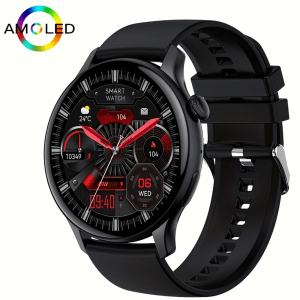
Thank you for purchasing a Kawtco Smartwatch! If you have any questions or need help in any way, please feel free to contact us. We will do our best to help. Your complete satisfaction is our number one priority. Please use this guide in conjunction with the smartwatch manual.
The Kawtco KC-HK85 Pro smartwatch and its accompanying “CO FIT” app are designed with user convenience in mind. Both platforms offer intuitive interfaces that guide users effortlessly through various features. The clear layout and logical organization of menus and options make navigation a breeze. Whether you’re tracking fitness goals, managing notifications, or adjusting settings, the smartwatch and app work in harmony to provide a seamless and enjoyable user experience.
To turn the smartwatch on press and hold the “POWER” button for about five seconds.
Connecting Your KC- HK85 Pro to Your Phone
- Download the App: Download and open the “CO FIT” app from the Apple App Store or Google Play Store. Follow the prompts to set up your free account profile. If you choose email setup, click “Verification Code (Register)” If you use Google or Facebook this will be bypassed.
- Turn on Bluetooth: Ensure Bluetooth is enabled on your phone.
- Pair the Devices:
- Open the “CO FIT” app. And click the “Device” tab on the bottom of the app.
- Click “Add Device”
- The app will search for nearby devices. Select your HK85 from the list and follow on-screen prompts. When paired a green arrow will appear on the watch.
Note: The specific steps might vary slightly based on the exact model of your phone and the version of the “CO FIT” app.
Other Tips and Tricks
1) To see messages on your watch (SMS, Facebook, WhatsApp, etc.): Under the “Device” tab in the app click “Notifications” – Choose the apps that you want to see new messages on your watch. You may need to give permission to the app in your phone’s settings.
2) Change Watch Faces: Under the “Device” tab in the app click “Watch Face Gallery”—Click “Sync” under the new face that you would like. The new watch face is now on the watch. To quickly change your watch’s face, that you have downloaded, simply press the knob once to wake up the watch and then rotate the knob to quickly switch between faces.
3)To Use Your Watch to Take a Picture with Your Phone: On the watch open the main menu by pushing the knob twice navigate to the “camera”. Click the camera to take a picture.
4) How To Set an Alarm: On your watch navigate to the Alarm menu and follow the prompts. You can also set alarms using the app.
5) To hear Music, AI voice, and media on the watch: Navigate to “music” on your watch. On the bottom left side of the screen, you will see a “phone icon”. You can toggle between phone and watch to choose where you will hear the media.
6) How to Add Important Contacts to Your Watch: Under the “Device” tab in the app click “Phonebook”—Click The “Add” Button—Choose the contacts that you want to add and click “Done”. The contacts will be synced to your watch.
7) How to Use AI Voice assistant: Go to the menu on your smartwatch and click “Voice”. Follow the prompts on the watch. The first time that you use it you may have to change the permissions on your phone. There should be a pop-up window on your phone. Follow the prompts to allow access to Siri (IOS). Bixby (Samsung), Google Assistant, Alexa etc.
8) How to follow Stock Prices on your watch): Under the “Device” tab in the app click “Stock Market”—Click “Add”—Search for the Stock symbol that you are looking for and click—Click the proper market and add. The stocks added will be synced with the watch.
9) How to turn off Audio on the watch: See Tip number five above.
Tips on How to Extend Your KC–HK85 Pro Battery Life
Reduce Screen Brightness: Lowering the screen brightness can significantly conserve battery power.
Limit Screen Timeout: Set the screen to turn off after a shorter period of inactivity.
Turn Off “Always on Display”: Always on display uses a significant amount of battery power.
Use Power Saving Mode: Activate the power saving mode when the battery is low.
Regular Charging: Avoid letting the battery drain completely or charging it to 100% all the time.
Turn Off “Raise to Wake” Function: Consider turning off or adjusting the “raise to wake” function during sleep or when you know you won’t be using the watch.
Reduce or Disable “Automatic Health” Monitoring: If you don’t need constant heart rate, Blood Pressure and blood oxygen monitoring, adjust the frequency.
Limit Notifications: Fewer notifications can reduce battery consumption.
Optimize App Usage: Close unused apps to prevent background activity.
Choose Watch Faces Wisely: Some watch faces might consume more power than others.
Remember: The battery life of a smartwatch depends on various factors, including usage patterns and environmental conditions.
By following these tips, you can significantly improve your KC-HK85 Pros’ battery performance.
See The Thin Round HK85 AMOLED Smartwatch on Amazon CLICK HERE