
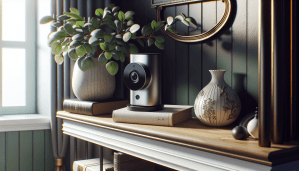
What do you think is the most crucial factor when it comes to choosing a camera that can store data in the cloud? Picking the right spy camera for your needs requires a fine balance between features, usability, and storage options. If you’re considering a spy camera that supports cloud storage, it’s essential to understand your requirements before making a decision.

Understanding Cloud Storage Spy Cameras
Cloud storage spy cameras are covert devices that allow you to monitor an area and store footage online. These cameras typically connect to Wi-Fi networks and upload captured video to cloud services, making it accessible from anywhere, any time, via your smartphone or computer.
This technology offers a blend of security and convenience, but not all cloud storage spy cameras are created equal. The selection process can feel overwhelming, but breaking it down into clear factors can help you make an informed choice.
Key Features to Consider
Before choosing a cloud storage spy camera, consider the following features:
1. Image Quality
The clarity of the footage is one of the most important features. Look for cameras that offer at least 1080p resolution for sharp images. Higher resolutions like 4K are excellent but may require more storage space.
2. Field of View (FOV)
The field of view determines how much area a camera can cover. A wider FOV allows you to monitor a larger space with a single camera. Cameras with a 120-degree FOV or more are usually sufficient for most needs.
3. Night Vision Capability
If you plan to monitor at night or in dim light, look for cameras that offer night vision. Infrared capabilities allow the camera to capture clear footage in dark conditions.
4. Audio Support
Some spy cameras come with built-in microphones, allowing you to capture audio along with video. Check local laws regarding audio recording to ensure compliance.
5. Motion Detection Alerts
Motion detection is a valuable feature that can notify you when movement is detected in the camera’s field of view. This can help you save storage space by recording only during significant events.
The Importance of Cloud Storage
Cloud storage is a feature that allows recorded footage to be stored online. This option provides several advantages:
1. Security from Theft or Damage
Since video footage is stored digitally on remote servers, it remains safe from theft or damage to the camera itself. Should your camera be misplaced or damaged, the footage is still accessible.
2. Remote Access
With cloud storage, you can access your recordings from anywhere with an internet connection. This flexibility can be comforting, allowing you to monitor your property or loved ones in real time.
3. Backup Options
Cloud storage often comes with backup features, ensuring that your data is not lost even if the camera malfunctions or if the wi-fi services are interrupted.
Evaluating Subscription Plans
Many cloud storage spy cameras come with subscription plans that offer different levels of service. Understanding these plans can guide you to find the best fit for your needs.
Free vs. Paid Plans
Many manufacturers offer limited free plans, but they often come with restrictions such as reduced storage time or fewer features. Paid plans can provide longer video histories, more simultaneous connections, and extended storage.
| Plan Type | Features Included | Limitations |
|---|---|---|
| Free Plan | Basic Storage, Limited Time | Short history, Fewer features |
| Basic Plan | Extended Storage, Extra Features | Limited camera connections |
| Premium Plan | Unlimited Storage, Advanced Features | Higher cost, More comprehensive access |
Storage Duration
When making a decision, consider how long you want footage to be stored. Many cloud services store video for 7 to 30 days, but some plans allow for longer retention if you’re willing to pay a higher fee.
Number of Connected Devices
Think about how many devices you might want connected under a single account. Some plans allow for just one camera, while others let you connect multiple cameras at once.
Choosing the Right Camera Placement
The placement of your spy camera can significantly impact its effectiveness.
Indoor vs. Outdoor Use
Determine if the camera will be used indoors, outdoors, or both.
Indoor Cameras
- Smaller and less weatherproof
- Ideal for monitoring rooms or hallways
- Can be hidden in decorative items or furniture
Outdoor Cameras
- Designed to withstand various weather conditions
- May have features like night vision or motion detection
- Often larger and more visible
Optimal Locations
When deciding on placement, consider points that cover high-traffic areas while remaining discreet. Here are a few common placements:
| Placement | Advantages |
|---|---|
| Corners of Rooms | Broad angles and less obstruction |
| Near Entrances | Capture everyone who enters/exists |
| Hidden in Bookshelves | Discreet monitoring of rooms |
Connectivity Requirements
A cloud storage spy camera requires a reliable internet connection to upload recordings. Here’s what you need to keep in mind about connectivity:
Wi-Fi Standards
Most modern cameras operate on 2.4GHz or 5GHz Wi-Fi bands. While the 2.4GHz band has a wider coverage area, it generally runs slower, while the 5GHz band is faster but shorter in range. Consider the layout of your space to determine the best frequency for your camera.
Network Security
Ensuring your camera is secure is essential to safeguard against unauthorized access. Make sure to:
- Change the default username and password.
- Use strong, unique credentials.
- Enable two-factor authentication if your device supports it.
Reviewing Privacy Considerations
While gathering information on your options, privacy is paramount.
Legalities of Surveillance
You should be aware of local laws regarding hidden cameras. Depending on your jurisdiction, secretly filming someone may be illegal without their consent, especially if audio is captured. Always research your local regulations.
Ethical Use
Using a spy camera responsibly means considering the privacy of those you’re monitoring. Avoid placing cameras in private areas such as bathrooms or bedrooms without explicit consent.
Integration with Other Smart Devices
Consider whether you might want your cloud storage spy camera to work with other smart devices in your home.
Home Automation Compatibility
If you already have a smart home set up, look for cameras that can integrate with systems like Google Assistant, Amazon Alexa, or Apple HomeKit. This compatibility can allow you to control your camera using a smart speaker or app.
Mobile App Features
A user-friendly mobile app can enhance your experience. When evaluating potential cameras, look for apps that offer:
- Live streaming
- Cloud storage access
- Push notifications for movement detected
Product Reviews and Research
Before you make a purchase, thorough research on different brands and products can save you time and money.
Checking Customer Reviews
Online reviews from current users provide valuable insights into a camera’s strengths and weaknesses. Look for comments on:
- Image and video quality
- Customer service experiences
- Ease of installation and setup
Comparing Brands
Some brands are more reputable than others in the cloud storage spy camera market. Consider comparing features and prices to ensure you are getting a good deal for the functionality you need.
Installation and Setup
Once you’ve chosen your camera, the installation and setup process should be straightforward and efficient.
DIY Installation
Many modern spy cameras come with easy-to-follow instructions and can be set up without professional help. Look for models that offer:
- Step-by-step installation guides
- Simple connection to Wi-Fi networks
- User-friendly mobile apps
Professional Installation Options
If you don’t feel comfortable installing the camera yourself, some companies offer installation services. Costs may vary depending on your selected model and location.
Troubleshooting Common Issues
Even the best technology can run into occasional hiccups.
Connectivity Problems
If your camera struggles to connect to Wi-Fi, try the following:
- Ensure it’s within range of your router.
- Restart the camera and router.
- Verify your Wi-Fi password is correct.
Quality Issues
If you notice blurry images or poor-quality recordings:
- Check lens cleanliness.
- Ensure adequate lighting in monitored areas.
- Adjust camera settings through the app.
Maintenance Tips
To keep your camera functioning effectively, regular maintenance is essential.
Firmware Updates
Manufacturers often release firmware updates to improve functionality and security. Regularly check for updates via the mobile app or the manufacturer’s website to ensure you’re using the latest version.
Cleaning Your Camera
Dust and dirt can accumulate over time and reduce image quality. Wipe the lenses gently with a soft cloth regularly to keep them clear.
Making the Final Decision
After reviewing all aspects and options, it’s time to make your decision. Reflect on what features matter most to you, align them with your budget, and think about your specific monitoring needs.
If you consider factors like image quality, ease of use, cloud storage features, and privacy laws, making a final choice should be easier. A well-informed decision will fit seamlessly into your lifestyle and ultimately provide peace of mind.
Conclusion
As you embark on your journey to select the right cloud storage spy camera, remember that understanding your needs and the features available is crucial. It’s not just about picking the most advanced camera; it’s about finding one that suits your specific requirements.
Taking the time to do your research and evaluate the factors mentioned can lead you to a choice that brings you satisfaction and confidence in your security measures. Whether it’s for monitoring your home, keeping an eye on your kids, or overseeing your workplace, the right spy camera can be a valuable tool when used responsibly.