
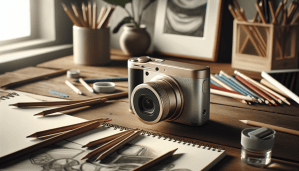
Are you looking to enhance your creative photography skills with the perfect USB camera? Finding the right camera can make a significant difference in capturing stunning images that reflect your unique vision.

Understanding USB Cameras
A USB camera is a versatile tool that connects directly to your computer, providing ease of use for photography and live streaming. These cameras often come with various features that can help you build your skills and expand your creativity. Let’s delve deeper into what makes USB cameras stand out.
What Makes USB Cameras Unique
USB cameras are designed for seamless integration with computers and are often more straightforward to set up than traditional cameras. They typically offer a wide range of functionalities that appeal to photographers, content creators, and streamers alike. The combination of quality and convenience makes them an attractive option for anyone looking to enhance their photographic capabilities.
Key Features to Consider
When choosing a USB camera, understanding the essential features can help you make an informed decision. Here’s a breakdown of what to look for:
Resolution
The resolution of a camera is crucial as it directly impacts the quality of your images. A higher resolution means more detail and clarity, which is vital for creative photography.
| Resolution | Use Case |
|---|---|
| 720p (HD) | Good for basic streaming |
| 1080p (Full HD) | Ideal for online content and photography |
| 4K (Ultra HD) | Excellent for high-quality images |
Frame Rate
Frame rate is essential for video recording and live streaming. It refers to how many frames per second (FPS) a camera can capture. Higher FPS is beneficial if you plan to shoot fast-moving subjects.
| Frame Rate | Use Case |
|---|---|
| 30 FPS | Standard for most online content |
| 60 FPS | Better for smoother motion videos |
| 120 FPS | Ideal for capturing high-speed action |
Low Light Performance
Good low-light performance is vital for creative photographers, as you often encounter various lighting conditions. Look for cameras equipped with larger sensors or advanced noise reduction technologies, which allow you to capture better images in dim environments.
Autofocus
Autofocus systems vary significantly among cameras. A reliable autofocus feature can enhance your workflow by ensuring sharp images without having to fiddle with manual settings constantly.
Portability
Portability is another pivotal factor to consider. If you plan to move around or travel a lot, a lightweight USB camera can make a welcome difference, allowing you to capture spontaneous moments without hassle.
Top USB Cameras for Creative Photography
Let’s break down some of the top USB cameras available on the market that can elevate your creative photography game.
1. Logitech C922 Pro Stream Webcam
This camera is popular among streamers and photographers alike due to its versatility.
Key Features:
- Resolution: 1080p at 30 FPS / 720p at 60 FPS
- Low Light Performance: Ideal for dimly lit spaces
- Autofocus: Yes, fast autofocus
Usage: The C922 is perfect for capturing high-quality images for both streaming and photography.
2. Razer Kiyo
What sets the Razer Kiyo apart is its built-in ring light, which enhances your low-light shooting.
Key Features:
- Resolution: 720p at 60 FPS / 1080p at 30 FPS
- Low Light Performance: Excellent due to the ring light
- Autofocus: Yes
Usage: This camera is a solid choice for those who need to incorporate lighting into their setup effectively.
3. Microsoft LifeCam HD-3000
A budget-friendly option that offers reasonable quality for various photography needs.
Key Features:
- Resolution: 720p
- Low Light Performance: Acceptable but not outstanding
- Autofocus: Fixed focus
Usage: This camera works well for simple photography needs without breaking the bank.
4. Canon PowerShot G7 X Mark III
While it’s primarily a compact camera, the G7 X Mark III functions beautifully as a USB camera.
Key Features:
- Resolution: 20.1 MP
- Low Light Performance: Superior performance
- Autofocus: Fast and reliable
Usage: This versatile camera excels in both photography and video, making it an excellent choice for creators.
5. Logitech BRIO
This high-end camera is ideal for professionals seeking top-notch quality.
Key Features:
- Resolution: 4K Ultra HD
- Low Light Performance: Exceptional
- Autofocus: Yes, with HDR capability
Usage: If you want to capture exceptionally high-quality images, the BRIO is an investment worth considering.
Accessories to Elevate Your Photography
Once you’ve chosen the right USB camera, consider investing in some accessories that can enhance your photography experience.
Tripods
Using a tripod can help stabilize your camera, enabling you to capture sharp and consistent images, especially in low-light conditions.
| Type | Use Case |
|---|---|
| Mini Tripods | Great for tabletop setups |
| Full-sized Tripods | Ideal for outdoor shooting |
Lighting Equipment
Proper lighting can significantly improve the quality of your photographs. Softbox lights, ring lights, or LED panels can create a well-lit atmosphere.
| Lighting Type | Feature |
|---|---|
| Softbox Lights | Soft, diffuse lighting |
| Ring Lights | Even illumination for portraits |
| LED Panels | Versatile for video and photography |
Lenses
Some USB cameras can utilize interchangeable lenses, allowing for greater flexibility in your photography style.
| Lens Type | Purpose |
|---|---|
| Wide-Angle Lenses | Ideal for landscape photography |
| Macro Lenses | Great for close-up shots |
| Prime Lenses | Excellent for low-light situations |
Maintenance of Your USB Camera
Taking care of your USB camera is crucial for longevity and performance. Here are some simple maintenance tips:
Regular Cleaning
Ensure that your camera lens is clean. Use a microfiber cloth specifically designed for camera lenses to gently wipe away dust and fingerprints. Keeping your equipment in good condition ensures optimal performance.
Software Updates
Check for software updates for your USB camera. Manufacturers often release new drivers or firmware to enhance performance or fix bugs, which can improve your photography experience.
Proper Storage
When not in use, store your USB camera in a protective case or bag. This can help prevent physical damage and dust accumulation.
Enhancing Photography Skills
Using a great camera is only one aspect of creative photography. Here are some strategies to take your skills to the next level:
Understanding Composition
Composition is crucial for creating visually appealing photographs. Familiarize yourself with concepts such as the rule of thirds, symmetry, and leading lines to create striking images.
Experimenting with Settings
Don’t be afraid to play around with your camera settings, including exposure, ISO, and white balance. Understanding how these elements interact will dramatically enhance your photography.
Seeking Inspiration
Look at the work of other photographers or artists. Platforms like Instagram, Pinterest, and photography websites can offer fresh perspectives and ideas that can inspire your work.
Joining Photography Communities
Connecting with fellow photographers can provide valuable feedback and insights. Look for online forums, social media groups, or local clubs where you can share your work and learn from others.
Frequently Asked Questions
What USB camera should I choose for streaming?
If streaming is your primary focus, consider cameras like the Logitech C922 Pro Stream Webcam or the Razer Kiyo. Both offer quality video capabilities and are user-friendly.
Can I use a USB camera for still photography?
Yes! Many USB cameras, especially those like the Canon PowerShot G7 X Mark III, are versatile enough for both still photography and video streaming.
Is low light performance essential for my photography?
If you frequently shoot in low-light environments, then yes. A camera with good low-light capabilities can help capture clearer and more vibrant images.
How can I improve my photography without a lot of equipment?
Start by practicing composition and experimenting with camera settings. Additionally, use natural lighting and explore your surroundings to learn more about photography.
Conclusion
Finding the right USB camera can transform your creative photography experience. With options ranging from budget-friendly to high-end models, you have the flexibility to choose a camera that fits your needs. Remember to maintain your equipment, invest in quality accessories, and continuously work on enhancing your skills.
As you embark on this photographic journey, embrace the creativity that flows from using a USB camera. Happy shooting!