Have you ever wondered if there might be hidden cameras in your Airbnb rental? The rise of short-term rentals has led to increased concerns about privacy, and it’s smart to ensure you’re staying safe while traveling. Many people share their spaces on platforms like Airbnb, and while most hosts are honest, it’s always a good idea to take precautions when it comes to your personal privacy.

Understanding the Basics of Hidden Cameras
What Are Hidden Cameras?
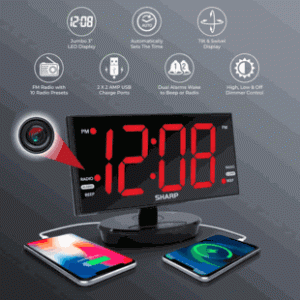
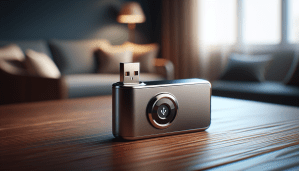
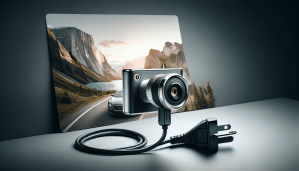
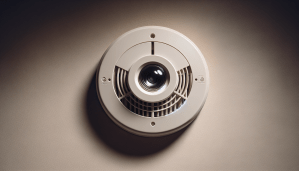
Hidden cameras are small surveillance devices that are designed to blend into the surroundings and go unnoticed. They can be disguised as everyday objects such as smoke detectors, clocks, or even picture frames. These cameras can be used for a variety of purposes, including security monitoring, but in a rental space, they might compromise your privacy.
Why Would Someone Use a Hidden Camera?
While it may seem unsettling, some hosts might use hidden cameras for security purposes, keeping an eye on their property to prevent theft or damage. However, the lack of transparency about their use can make guests feel uncomfortable and invade their personal space. It’s your right as a guest to know what surveillance, if any, is taking place.
Signs of Hidden Cameras
Visual Inspection
The first step to detect hidden cameras is a thorough visual inspection of the rental space. Here’s what to look for:
| Item | Description |
|---|---|
| Suspicious Objects | Look for devices that seem out of place or unusual. |
| Lens Glints | Camera lenses can reflect light; look for small shiny spots. |
| Unusual Wires | Check for wires that appear to lead nowhere or connect unusual objects. |
| Recent Modifications | Notice any recent renovations or alterations, especially in living areas. |
Take your time when inspecting each room, focusing on the places where you might expect privacy, like bathrooms and bedrooms.
Check Common Hiding Spots
Hidden cameras are often placed in areas where they can capture a wide view of the space. Common spots include:
- Smoke detectors
- Wall clocks
- Between books on shelves
- TVs and other electronics
- Air purifiers and other common appliances
Spend a few minutes looking closely at these locations. If you find anything that feels suspicious, don’t hesitate to investigate further.
Using Technology to Your Advantage
Smartphone Apps
Technology has made it easier than ever to detect hidden cameras. Several apps can help you scan for unusual wireless signals or devices.
Here are some popular options:
| App Name | Description |
|---|---|
| Hidden Camera Detector | This app scans for devices communicating via Wi-Fi or Bluetooth. |
| Fing | This network scanner shows all devices connected to the same network. |
| Glint Finder | This app helps identify camera lenses by detecting reflections. |
Simply install the app before your trip, and do a scan of your Airbnb after you arrive.
Using a Flashlight
If you don’t want to rely on technology, a simple flashlight can be an effective tool.
- Turn Off the Lights: Begin your inspection in a dark room.
- Shine the Flashlight: Point the light at various surfaces.
- Look for Reflections: If you see a tiny pinhole reflection, it could indicate a hidden camera lens.
This method can be particularly useful, especially when inspecting places where cameras might be hidden, such as on ceilings or high shelves.
Understanding Legal Considerations
Know Your Rights
Understanding the legal landscape regarding surveillance is crucial for anyone renting a property. Most areas have laws that protect your privacy, but these can vary.
- Consent: In many places, landlords must disclose any surveillance devices on the property, especially in spaces where guests expect privacy.
- Recording: Laws often prohibit recording in private areas like bathrooms and bedrooms, even if cameras are installed elsewhere in the home.
Before you book your stay, it may be worth researching local laws or checking Airbnb’s own policies regarding surveillance in rentals.
What to Do If You Find a Camera
If you do discover a hidden camera, it’s important to take the right steps.
- Document the Evidence: Take photos of the camera and its surroundings, ensuring that you have proof of what you found.
- Confront the Host: If you feel comfortable, you may want to discuss your findings with the host to understand their reasoning.
- Report the Incident: If the camera feels intrusive, report it to Airbnb. They have policies in place for handling such issues, including giving you a way to request a refund or a different rental.
Communication with Your Host
Asking the Right Questions
Before you book your Airbnb, consider asking the host specific questions about surveillance to ease any concerns. Here are some examples of what you might ask:
- “Are there any surveillance devices on the property?”
- “If so, what areas do they monitor?”
- “Are guests notified about their existence?”
These conversations can establish transparency and may help you feel more at ease during your stay.
Review the Listing Description
Often, hosts will include information about surveillance in their listing. Before making a reservation, take a moment to read through the details provided by the host.
- Look for Keywords: Terms like “security cameras” or “surveillance” should prompt closer attention to ensure you’re comfortable with the monitoring methods in place.
If the listing doesn’t mention anything, that could be a red flag. Don’t hesitate to reach out for clarification if something feels off.
What to Do If You’re Feeling Uneasy
Trust Your Instincts
Your feelings are valid. If something feels wrong or seems suspicious, trust your gut.
- Avoid overthinking things, but if something feels out of place, it’s worth further investigation or consideration about finding another rental.
Seek Alternatives
If you’re feeling particularly anxious about surveillance, consider booking a rental from a host with a solid reputation. Look for reviews that mention privacy and security.
- Check Reviews: Look for past guests who have commented positively about their privacy and safety.
You can also choose accommodations that are less likely to contain hidden cameras, such as hotels or traditional bed-and-breakfasts where privacy may be better protected.
Importance of Privacy and Security
Enhancing Your Experience
Traveling should be a stress-free experience, and knowing that your privacy is protected enhances your peace of mind. When you feel secure, you can focus on enjoying your trip rather than worrying about unexpected surprises.
Long-Term Considerations
As the trend of short-term rentals continues, concerns about privacy become increasingly important. Both guests and hosts should foster conversations around safety to build trust and understanding within the community.
- Feedback Loops: Encourage guests to share their experiences and concerns about privacy openly so that future travelers can benefit from a collective awareness of best practices.
Final Thoughts
Taking steps to detect hidden cameras in your Airbnb can feel daunting, but knowing what to look for and how to use technology to your advantage can help you feel empowered. You have every right to enjoy your accommodations without the worry of invasive surveillance.
Now that you’re armed with the knowledge to navigate privacy concerns in your rentals, you can travel with confidence. By conducting thorough inspections, utilizing technology, and asking the right questions, you can ensure your stay remains both enjoyable and safe. Always remember to prioritize your comfort and take action if something doesn’t feel right. Happy travels!