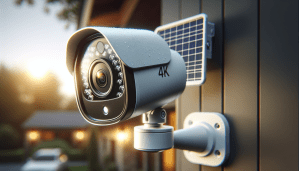
Are you thinking about upgrading your home security with the Security Cameras Wireless Outdoor, 4 Cam-Kit, 4K Color Night Vision, Solar Security Camera System with 360° PT, No Monthly Fee, 32G Local Storage HomeBase, AI Recognition, DIY Installation?

Quick summary
You’re getting a complete, solar-powered 4-camera kit that promises 4K clarity, color night vision, AI-based notifications, and a local HomeBase with no monthly fees. It’s aimed at people who want high-resolution continuous monitoring without cloud subscriptions and who prefer a largely wireless, DIY-friendly setup.
What’s in the box
When you unbox this kit, you’ll find four PT cameras, one H200 HomeBase with 32GB onboard storage, solar panels with mounting hardware, and the usual power adapters and cables. You’ll also get mounting brackets and a few screws so you can get started quickly without running extra wires if you position the cameras within WiFi range.
Hardware overview
Each camera is designed for outdoor use with a rotating 360° panoramic lens and a built-in solar charging port so it can stay topped up during the day. The HomeBase acts as the local NVR, handling recording, AI processing, and cross-camera features to keep everything on your local network.
Camera specs at a glance
The cameras are 8MP (marketed as 4K Ultra HD) with color night vision, AI person/vehicle/pet recognition, and 360° pan/tilt functionality. They include a 10000mAh internal battery for backup and a solar panel for continuous top-up, plus a weatherproof design for outdoor installation.
HomeBase specs at a glance
The H200 HomeBase ships with 32GB of looped local storage and supports HDD expansion up to 16TB for long-term archival. It acts as the hub for AI features, cross-camera tracking, and local access so you don’t have to rely on third-party cloud services.


Quick technical breakdown (table)
Here’s a simple table to help you scan the main specs and features quickly.
| Feature | Details |
|---|---|
| Camera resolution | 8MP (4K Ultra HD) |
| Night vision | Color night vision (vivid color in low light) |
| PT range | 360° panoramic pan/tilt |
| AI features | BOTSLAB IQ: person/vehicle/pet recognition, custom alerts, quick search |
| Local storage | H200 HomeBase with 32GB onboard, expandable to 16TB (HDD) |
| Power | Solar panel + 10000mAh internal battery |
| Connectivity | 2.4GHz WiFi |
| Subscription | No monthly fee |
| Installation | DIY, wireless (with solar) |
| App | BOTSLAB app with multi-camera view and cross-camera tracking |
Image quality and day performance
You’ll notice the 4K footage is crisp and full of detail during daylight; faces, license plates, and fine textures are much easier to see compared to typical 1080p cameras. The colors are vivid, and the image processing seems tuned to minimize blur and preserve clarity even when objects move across the frame.
You should still keep expectations realistic: 4K requires good lighting and bandwidth to stream smoothly, and while the onboard image sharpening helps, the best results come when cameras are critically focused and aimed at the areas you care about.

Night vision and low-light performance
The standout here is the color night vision, which keeps scenes in natural colors even in low light, so you can often identify clothing colors or vehicle paint without switching to grainy black-and-white IR mode. The system’s sensors plus the image processing give you usable color imagery in many conditions where other cameras would revert to monotone.
If you’re monitoring a completely dark area, the solar panels and battery help keep the camera powered, but note that extreme darkness or heavy fog will always reduce clarity, and there are limits to how much the camera’s sensor and processing can recover.
Video resolution, frame rate, and file sizes
4K resolution offers a lot more pixel detail, which is great for evidence capture but consumes more bandwidth and storage. The H200’s 32GB is fine for short-term loops, but if you want weeks or months of archival footage at 4K, you’ll want to plan on HDD expansion.
If you’re concerned about file sizes, you can usually set event recording to a lower bitrate or reduce continuous recording quality in the app to balance clarity with storage needs and localized network performance.

BOTSLAB IQ: AI recognition and smart alerts
The system’s AI (BOTSLAB IQ) identifies people, vehicles, and pets with descriptive notifications so you don’t have to open the app to know what kind of event occurred. It tries to filter out harmless motion so you get fewer false alarms from leaves, small animals, or shadows.
You’ll appreciate the quick search function that helps you find people, vehicles, or objects in historical footage within seconds; this is handy if you need to trace movement across multiple cameras during a single time period.
BOTSLAB notifications in practice
Notifications are text-based and can include descriptions like “person at front gate” or “vehicle parked,” which helps you triage alerts. The AI is pretty reliable but not perfect — you should still glance at event clips to confirm details before taking action.
Smart search and historical tracking
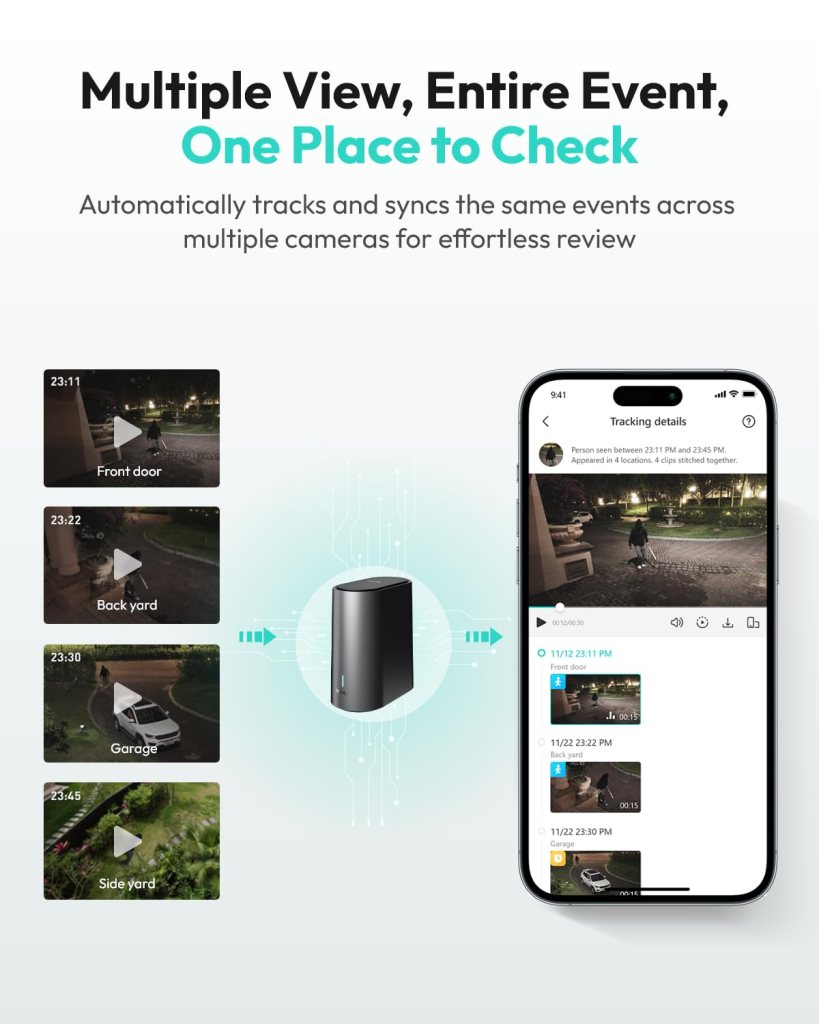
The H200 supports cross-camera correlation, so it can link events across cameras that occurred around the same time, making it easier to follow a person or vehicle across multiple angles. This saves a lot of time when reviewing footage for a specific incident.
360° pan/tilt surveillance and tracking
The 360° PT lens is beneficial if you want broad coverage with fewer blind spots, and it helps the camera auto-track moving objects across its field of view. The motors are generally smooth, and the tracking function will follow people and vehicles so you don’t miss a moving target.
Keep in mind that PT tracking works best in open areas without lots of visual clutter, and very fast-moving subjects may occasionally cause tracking to lag or lose the target temporarily.
Tracking accuracy and behavior
Tracking is tuned to prioritize people and vehicles, which is practical for security use. It’s still wise to test the tracking flow in the specific layout where you’ll mount the camera because walls, fences, or reflective surfaces can affect performance.
Storage and privacy: local-first approach
You get 32GB of local storage on the H200 out of the box, which loops and can hold up to about two months of event-driven footage depending on settings. The main privacy advantage is local storage control — your recordings stay on your HomeBase unless you choose to export or back them up.
If you’re privacy-minded, this local-first design removes the need to send everything to a cloud server, but remember that having local storage doesn’t replace good password hygiene and network security.
Expandability and archival storage
You can expand the H200 storage up to 16TB with an HDD if you need long-term archives or higher retention at full 4K. That makes it practical for businesses or homeowners who want weeks or months of continuous coverage without subscription fees.
Connectivity: WiFi and network considerations
The system uses 2.4GHz WiFi to maintain longer-range and more stable connections to the H200. This frequency is better at penetrating walls than 5GHz, but you should ensure your router placement gives good coverage to each camera’s location.
If your network is crowded or has intermittent performance, you may notice lags when streaming live 4K or when multiple cameras are active simultaneously. Consider a dedicated SSID or stronger router if you plan to stream a lot of high-res video.
Latency and multi-camera streaming
Streaming multiple 4K feeds can tax a mid-range router, so you may see latency or frame drops on older network gear. If you want near-instant live viewing, prioritize network upgrades or reduce streaming resolution to keep things smooth.

Power and solar performance
The included solar panel plus the camera’s 10000mAh internal battery aim to give you continuous operation without frequent battery swaps. In sunlit climates or if mounted in a sunny spot, you can expect the solar panel to maintain charge even with regular event recording.
You’ll want to test your chosen location for several days to confirm the solar panel receives consistent sunlight, especially in winter or in shadowed areas. If you live in a consistently cloudy region, plan on a backup power option or more frequent charging via the provided adapter.
Battery backup and worst-case scenarios
The 10000mAh battery backup provides buffer time for nights, cloudy stretches, or periods of heavy event recording. Even so, heavy motion-triggered recording or extended cloudy periods could drain the battery faster than the solar panel can recover, so monitor battery statistics in the app.
Installation and DIY setup
This system is designed for DIY installation: mount the brackets, secure the solar panels, position the cameras in WiFi range, and link them to the HomeBase via the BOTSLAB app. You don’t need to run Ethernet to each camera, which saves time and cost if your desired camera locations have decent wireless coverage.
If you’re not comfortable with ladders or drilling into wood/fascia, you may want a hand from a friend or a local installer, but most homeowners should be able to handle installation within an hour per camera under normal conditions.
Step-by-step basics
You’ll typically mount the solar panel, affix the camera nearby, power it up, and follow the on-screen app prompts to pair the camera with the H200. The app walks you through calibration and test recordings so you can fine-tune angles before finishing the install.
Mounting tips for best results
Place the solar panel where it catches direct sun for most of the day and keep the camera high enough to avoid tampering but angled to cover the area of interest. Tilt the camera for the best balance between wide coverage and detail at the critical zones like doors, gates, or driveway entrances.
BOTSLAB app: daily use and user experience
The BOTSLAB app is designed to let you manage multiple cameras, view live feeds, receive descriptive AI alerts, and search historical footage quickly. The cross-camera tracking feature and four-zone monitoring make it straightforward to monitor key areas at a glance.
Expect a learning curve if you want to customize zones, sensitivity, and pairing advanced features, but overall the app is functional and practical for daily use.
Multi-camera workflows and monitoring
You can view up to four zones simultaneously and jump between camera feeds quickly, which helps if you’re watching several areas or trying to follow a single event across multiple cameras. The quick-search feature speeds up incident review, especially when you need to find people or vehicles across several hours of footage.
Reliability, durability, and weatherproofing
The cameras are built for outdoor use with a weatherproof housing and solar power support, so they’re meant to handle rain, sun, and everyday outdoor wear. Build quality is generally solid for the price point, but you should expect plastic components in some parts of the housing and brackets.
Check the IP rating and manufacturer guidance for extreme temperatures if you live in a very hot or freezing location; electronics like batteries perform differently in severe conditions.
Expected maintenance and longevity
You’ll need to keep the solar panels clean of dust and debris and occasionally check mounting hardware for corrosion or loosening. With reasonable maintenance, these cameras should last several years, but battery capacity may slowly decline over longer time frames.
Use cases and practical placement suggestions
This kit is ideal for perimeter security, driveways, backyards, and business storefronts where you want wide coverage without running a lot of wires. The 360° PT capability also makes it good for monitoring larger open areas where you’d otherwise need multiple fixed cameras.
If you want to monitor a narrow corridor or focus on a small area like a side door, you might prefer a fixed, higher-resolution placement or additional cameras to reduce blind spots.
Specific placements that work well
Mount one camera to cover the driveway and entrance, another for the backyard/patio, one for a side yard or garage approach, and the last for a rear gate or business frontage. Positioning them at 8–10 feet high typically balances tamper resistance and recognition detail for faces and license plates.
Pros and cons
You’ll find strong positives in image quality, color night vision, AI features, local storage, and solar convenience. The main trade-offs are potential WiFi bandwidth demands for 4K streaming, limited out-of-the-box storage for long-term retention, and the usual caveats for solar performance in low-sun regions.
Pros:
- High-quality 4K image and color night vision.
- No monthly fee and local storage with HDD expandability.
- AI recognition, cross-camera tracking, and quick search.
- Solar-powered with 10000mAh battery backup for minimal wiring.
Cons:
- 4K streaming requires solid WiFi and may tax older routers.
- 32GB onboard storage is limited for extended 4K retention.
- Solar performance varies by location and season.
- AI isn’t perfect; occasional false positives or missed events can occur.
How it compares to other systems
Compared to cloud-first brands, this kit’s local storage and no-subscription approach is a strong privacy and cost advantage over time. Against other solar or battery-powered camera kits, it stands out for 4K and 360° PT, but some alternatives may offer better app ecosystems or wider third-party integrations.
If you’re choosing between systems, weigh how much you value local storage and subscription-free operation against the convenience and features of cloud-based services.
When to pick this system
Choose this kit if you want high-resolution, local-first recording and prefer paying once rather than ongoing subscription fees. It’s particularly well-suited if you have decent WiFi, sunny mounting locations, and a need for wide-area monitoring with PT tracking.
When to consider alternatives
Look elsewhere if you want deep cloud integration, professional monitoring, or a plug-and-play ecosystem that already matches your smart-home system. Also consider other cameras if you need guaranteed operation in heavily shaded or very remote locations without solar access.
Troubleshooting common issues
If a camera loses connection, check WiFi signal strength, HomeBase placement, and that the camera firmware is up to date. For battery or charging problems, inspect the solar panel orientation and connections and monitor battery percentages in the app.
If the camera reboots frequently or the AI mislabels events often, a firmware update or a reset/repair cycle can resolve many quirks.
Firmware updates and vendor support
Keep the H200 and cameras updated as new releases often improve AI accuracy, resolve bugs, and enhance compatibility. If you run into a persistent problem, vendor support can guide advanced troubleshooting or replacement steps if hardware faults are identified.
Privacy, encryption, and legal considerations
Because footage is stored locally on the H200, you maintain control of recorded footage unless you choose to upload or share it. Still, you should secure the HomeBase and app with strong passwords, two-factor authentication if available, and network segmentation to reduce the risk of unauthorized access.
Be aware of local laws about audio/video recording, especially if cameras point at public spaces or neighbors’ property, and ensure you disclose or position cameras in a legally compliant way in your jurisdiction.
Data security best practices
Use unique, strong passwords for the BOTSLAB app and HomeBase, keep firmware current, and consider placing the HomeBase behind a guest or segmented network to limit exposure. If you ever need to transfer or back up footage, do so over secure methods and wipe exported drives when no longer needed.
Maintenance tips and seasonal checks
Check solar panels for dirt, bird droppings, or snow, and clean them regularly to keep charging efficiency high. Inspect mounting screws and seals annually to maintain weatherproofing and make sure firmware updates are applied to stay current on security improvements.
Also periodically review AI alerts and recordings to adjust detection zones and sensitivity as seasons change and vegetation grows or recedes.
Final verdict
If you’re looking for a subscription-free, local-storage 4K system with color night vision, AI recognition, and solar capabilities, this kit is a compelling option that balances advanced features with DIY practicality. It’s especially attractive when you value privacy and want to avoid ongoing fees while still having modern AI features and cross-camera correlation.
Who should buy this
You should buy this if you’re comfortable with a bit of DIY, have decent WiFi coverage at your desired camera locations, and want high-resolution monitoring without recurring costs. It’s a great choice for homeowners, small businesses, and anyone who prefers local storage and solar-powered convenience.
Final recommendations and tips
Before you mount, test a few camera positions temporarily to confirm WiFi strength and solar exposure over several days. Consider expanding H200 storage if you expect to keep long 4K archives and periodically check app settings and firmware to keep the system performing at its best.
If you’ve got specific questions about placement, WiFi setup, or expanding storage, tell me where you plan to mount the cameras and what kind of coverage you need, and I’ll help you fine-tune the setup.
Disclosure: As an Amazon Associate, I earn from qualifying purchases.