? Looking for a solar-powered, privacy-first, AI-driven security system that keeps your footage local and your home protected?

Quick Verdict
You’ll like the AOSU 4K Solar Security Cameras Wireless Outdoor, Expandable to 16TB (32GB Built-in) HomeCortex Home Security System, AI Face Recognition & Behavior Detection, 6-Cam Kit if you want a fully wireless setup with strong on-device AI and flexible storage. It combines crisp 4K video with local processing so you get fast alerts without sending everything to the cloud.
What this product is
You get a six-camera kit centered around the HomeCortex hub, which runs an on-device AI model to handle face recognition, behavior analysis, and local storage. The bundle includes solar-powered cameras designed to avoid constant recharging and a system architecture that emphasizes privacy and local control.
Who this is for
If you value privacy and want an intelligent system that recognizes family members and flags suspicious behavior, this kit is a good match for you. It’s also suitable if you prefer a largely self-contained system that can scale up to a lot of local storage without mandatory cloud subscriptions.
Main specifications at a glance
You should be able to see the most important specs at a glance to decide if this system meets your needs. Below is a table that breaks down core technical details and their practical meaning for you.
| Specification | Detail | What it means for you |
|---|---|---|
| Cameras in kit | 6 | Covers multiple angles around a typical house — front door, driveway, backyard, etc. |
| Resolution | 4K (3840×2160), 8MP | Very sharp video that retains detail for recognition and evidence. |
| Local Storage | 32GB built-in, expandable to 16TB | You can keep footage locally; expand for weeks/months of retained video. |
| SolarBoost Technology | Integrated solar panels, works in low light and down to -10°C | Reduced battery maintenance and fewer recharges, even in cooler or shady conditions. |
| AI Processing | On-device HomeCortex model | Faster alerts, family recognition, behavior analysis, no cloud required. |
| Max Cameras Supported | Up to 6 connected to HomeCortex | This kit uses the hub’s full capacity, ideal for full-home coverage. |
| App View | Up to 4 camera feeds simultaneously | Monitor key angles live without switching between cameras. |
| Behavior Detection | Recognizes patterns and flags repeat visitors | Smarter notifications that distinguish risk levels over time. |
| Connectivity | Wireless cameras to HomeCortex hub | Easier installation with fewer wires to run around the house. |
| Weatherproofing | Outdoor-rated (IP65/IP66 typical) | Cameras are built to handle rain and outdoor conditions. |
Unboxing and first impressions
When you open the box you’ll notice the build quality is solid and thoughtfully packed for straightforward installation. The hub, solar panels, mounts, and cables are organized and labeled so you won’t fumble finding what you need.
The cameras feel sturdy and have a no-nonsense aesthetic that fits most home exteriors without drawing too much attention. You’ll also appreciate that the solar panels are integrated and look streamlined rather than clunky add-ons.
Setup and installation
You’ll find the setup process is designed for DIY installation: pair each camera to the HomeCortex hub, mount the solar panel, and position cameras with basic tools. Most users should be able to get everything working within an hour for a single camera and a couple hours for the full six-camera setup.
Because everything communicates wirelessly with the hub and the cameras are solar-powered, you don’t need an electrician for routine placement. Still, plan camera locations carefully to maximize solar exposure and maintain robust signal strength to the hub.
Pairing and network tips
Pairing happens locally through the HomeCortex interface and the companion app, so you’re not depending on a remote server for initial setup. Make sure the hub is centrally located to reduce signal dropouts and test feed quality in your intended camera spots.
If you have thick walls or long ranges, consider where the hub sits in your home network; you may need to adjust or add a Wi-Fi extender to keep robust connectivity between hub and router.
Hardware and design
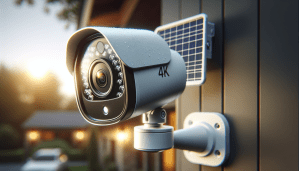
The cameras have an all-weather casing, with a metal or heavy-duty plastic mount and a compact solar panel attached. The overall design balances ruggedness with a discreet profile so they’re practical without being obtrusive.
The HomeCortex hub itself is compact enough to tuck into a closet or shelf and includes ports for optional wired storage or backup. Its LEDs and ports are accessible but muted for a clean setup.
Camera performance: day and night
You’ll get crisp daytime footage in 4K that captures license plates, facial details, and small movements clearly. At night, the infrared or low-light performance preserves usable detail, though natural limitations of night imaging mean color and clarity depend on ambient light.
The system emphasizes detail at distance, so you’re more likely to be able to identify people or objects beyond standard camera ranges. You’ll still want to verify placement and focus during setup so important zones are clear.
Video quality and bitrate management
Because you’re working in 4K, files can get large quickly, but the HomeCortex offers local compression and efficient storage management. The result is that you’ll retain long-term footage without exhausting storage, provided you size your drive appropriately.
When you monitor live or playback, the app gives you fluid streaming and options to lower resolution for remote viewing to save bandwidth. This helps if you’re on mobile data or want quick review without downloading massive clips.
AI features: face recognition and behavior detection
The HomeCortex runs on-device AI to identify family members and flag unfamiliar faces quickly, which reduces false alarms and delivers more meaningful alerts. You can train it to distinguish between people you know and people you don’t, and it recognizes repeat visitors even if they change clothes.
Behavior detection analyzes movement patterns and assigns risk levels to contacts that recur or act suspiciously. The system also highlights unusual behaviors like lingering or repeated approach attempts, which provides context beyond simple motion detection.
Smart video search and sorting
Searching for footage becomes easier because the system automatically tags events, people, and objects, letting you jump straight to relevant clips. You can filter results by person, event type, or time window, saving you from hours of manual review.
The AI also creates daily activity summaries so you can quickly see what was notable each day. Those summaries point out potential threats and familiar comings-and-goings, helping you prioritize what to review.
Local processing and privacy
All the AI runs locally on HomeCortex, so your images and recognition data don’t need to be uploaded to remote servers for analysis. If privacy is a major concern, this design keeps sensitive footage under your control and reduces exposure to cloud-related breaches.
You still have optional cloud backup if you want redundancy, but that’s your choice rather than a requirement. You’ll benefit from faster local alerts and reduced latency because processing happens on the hub instead of waiting for the cloud.
Storage options and management
The kit includes 32GB of built-in storage, which is useful for immediate operation but will fill quickly with 4K footage. You can expand up to 16TB, giving you the flexibility to retain weeks or months of footage depending on compression and motion activity.
Storage management features let you overwrite older footage automatically and set retention policies per camera. You can also configure backup to cloud storage if you want an extra copy of critical clips.
Solar performance and battery life
The integrated SolarBoost Technology is designed to charge efficiently in low-light or shaded conditions and claims to keep a camera running even in cooler temperatures down to -10°C (14°F). In typical conditions, just a few hours of sunlight on the panel can sustain a day of operation.
Depending on your local weather patterns, you’ll want to position panels to maximize sun exposure and avoid constant shadowing. For very high-traffic locations, occasional supplemental charging or a wired option might be required to keep 24/7 recording.
App and user experience
You’ll interact with HomeCortex primarily through the companion app, which supports live viewing, playback, AI tagging, and system settings. The interface is designed for everyday users and makes it simple to assign identities, review alerts, and manage storage.
The app can show up to four camera feeds at once, giving you a strong overview without overwhelming the screen. You’ll also appreciate customizable push notifications that let you prioritize what types of events should trigger an alert.
Notifications and alert tuning
Notifications are smart and can be tuned to reduce false positives by adjusting sensitivity and event types. You can choose smart alerts (people/face, behavior) or basic motion-only alerts depending on your needs.
The system’s ability to recognize family members reduces nuisance alerts and helps you focus only on unfamiliar or suspicious activity. For example, you can mute notifications for recognized household members during typical arrival times to avoid repeated pings.
Reliability and weatherproofing
The cameras are built for outdoor exposure and include seals and coatings to resist rain, dust, and temperature shifts. In most climates they’ll provide reliable year-round operation, though extreme conditions still require careful placement.
Firmware updates are delivered to improve performance and security, so you should keep the system updated to enjoy bug fixes and enhancements. The on-device AI model can also receive optimizations without compromising local processing.
Expandability and integrations
This kit supports up to six cameras on the HomeCortex hub and offers storage expansion up to 16TB, so you can scale if you want additional coverage. The system is designed to remain mostly closed-loop for privacy, but some integrations with smart home ecosystems may be available depending on firmware and app versions.
If you want more than six cameras or tighter integration with third-party automation, check for compatibility and potential workarounds before purchasing. For most homeowners, the supported limit will be sufficient.
Installation tips for best results
Pick mounting locations with good sun exposure for the solar panel and a clean line of sight for the camera to avoid motion-activation by nearby vegetation. Test each camera at night and during different lighting conditions to adjust angles for optimal facial and object capture.
Label your cables and mounts while installing so you can revisit camera orientation easily later on. If you have pets or regular foot traffic near a camera, adjust the detection zones and sensitivity to prevent unnecessary clips.
Troubleshooting common issues
If a camera loses connection, first check solar charge levels and hub placement, then verify Wi-Fi strength at the camera. Re-pairing the camera to the hub usually resolves persistent communication problems, and firmware updates often address stability issues.
For alert spam, tune AI sensitivity or set activity zones to ignore driveways or tree lines that trigger motion. If you run into persistent problems, reach out to AOSU support for firmware guidance and diagnostic steps.
Support, warranty, and updates
You should expect product support for setup, troubleshooting, and firmware updates, and the vendor typically provides a warranty to cover defects. Keep your purchase receipt and register the product so you can access warranty services if needed.
Regular firmware updates enhance AI accuracy and security, so enable automatic updates if you’re comfortable with that. The company’s support channels can also help with advanced settings or complex installations.
Pros and cons
You’ll appreciate the strong privacy stance, 4K resolution, solar charging, and on-device AI, but there are trade-offs to consider with 4K storage needs and potential limits on integrations. The system’s wireless convenience comes with the need to carefully plan solar exposure and hub placement for best results.
The pros give you a compelling package for privacy-first home security, and the cons are manageable with planning and optional storage choices.
Comparison with similar systems
Compared to cloud-centric systems, this kit reduces your dependency on subscriptions and remote servers while giving faster on-device recognition. Against other local AI systems, it stands out for integrated solar charging and 4K detail, though some competitors might offer broader smart home integration.
If you prioritize privacy and battery-powered installation, this is a stronger fit than many wired or cloud-required systems. If you prefer deep third-party smart home automation, double-check compatibility before choosing this kit.
Who should consider alternatives
If you need more than six cameras supported by a single local hub, or you require deep integration with an existing smart home platform, you might look at other systems. Likewise, if you prefer a purely cloud-based approach for automatic offsite backup and simpler remote access without local hardware, a cloud-first system could suit you better.
Also consider alternatives if you live in an extremely shaded property where solar charging won’t be reliable, unless you plan to rely on supplemental power sources.
Practical use cases
You can use this system to secure your front door, driveway, backyard, and side paths while getting meaningful alerts about repeat visitors or suspicious behavior. It’s also useful for keeping track of deliveries, monitoring a pool area, or checking who’s at the gate with clear identification in 4K.
Families appreciate the face recognition to reduce false alarms and get quick highlights of family activity. Small property owners or renters who can’t run hardwiring will value the wireless, solar-first design.

Tips to get the most out of the system
Position cameras about 7–9 feet high to balance facial recognition and field of view, and angle them slightly downward to avoid sky glare. Configure activity zones and set labeled family profiles to minimize notifications and increase accuracy.
Regularly check solar panel cleanliness and firmware updates, and expand storage ahead of heavy-use periods like holidays. Finally, practice reviewing the app’s smart summaries to quickly catch important events without sifting through hours of footage.
Final thoughts
If you want a privacy-first, wireless security solution with strong AI and flexible local storage, the AOSU 4K Solar Security Cameras Wireless Outdoor, Expandable to 16TB (32GB Built-in) HomeCortex Home Security System, AI Face Recognition & Behavior Detection, 6-Cam Kit is a compelling choice. You’ll gain crisp 4K video, intelligent local processing, and the convenience of solar charging, provided you plan placement and storage needs carefully.
This system is particularly attractive for homeowners who prioritize local control and want meaningful notifications rather than a constant stream of motion alerts. With thoughtful setup and maintenance, it can be a reliable cornerstone of your home security strategy.
Disclosure: As an Amazon Associate, I earn from qualifying purchases.