For lawful use only. Custom made to order — may take up to 3 days to ship.


Product overview
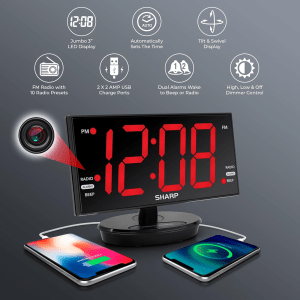
The StealthView Covert Spy Camera — 1080P HD Wi‑Fi Clock Radio is a professional-grade surveillance solution disguised as a fully functioning SHARP alarm clock. If you need a discreet way to monitor a room without drawing attention, this product gives you high-definition video, remote streaming, built-in storage, and a clock radio that behaves like every other device on the nightstand. You get 1080P video, H.265 compression, 128 GB internal memory, and continuous AC power — all packed into an innocuous-looking alarm clock with a swiveling 8.9″ LED face so you can subtly aim the lens.
What it is and who it’s for
This device is designed for people who need covert monitoring while preserving the normal look and function of the environment. Typical users include homeowners who want to protect assets or gather evidence of theft, managers who need to monitor common office areas for safety and compliance, and renters who want a temporary, low-profile monitoring solution for short-term accommodations. If you need to capture clear, time-stamped footage without drawing attention, the StealthView is meant for you.
You should keep in mind that this device is intended for lawful use only. You are responsible for making sure you have the right to record in the locations where you use it and for complying with local, state, and federal privacy and wiretapping laws.
Quick features at a glance
Below is a compact breakdown so you can scan the essential specs quickly.
| Feature | Details | Why it matters |
|---|---|---|
| Video resolution | 1080P HD (with audio) | Clear, legally useful footage with identifiable detail |
| Compression | H.265 | Efficient storage and longer recording on the same memory |
| Connectivity | Wi‑Fi for live streaming and remote access | View live or recorded footage from your phone anywhere |
| Internal storage | 128 GB (preinstalled) | Large onboard capacity; no need for SD cards |
| Recording modes | Motion‑activated and continuous | Save storage and battery resources with motion mode; continuous when you need constant coverage |
| Motion detection | Intelligent detection with mobile alerts | Receive instant notifications when the device detects movement |
| Power | AC powered (non‑stop operation) | Reliable, continuous recording without battery swaps |
| Camera concealment | Lens hidden in alarm clock; swiveling 8.9″ LED face | Maintains plausible deniability and allows subtle aiming |
| Clock utilities | SHARP AM/FM radio, alarm, snooze, 3 brightness levels | Keeps the device functional and inconspicuous |
| USB ports | 2 working USB charging ports | Added utility that reduces suspicion and powers devices |
| Includes | Device, power adapter, user manual | All essential accessories supplied |
| Shipping | Custom made to order — up to 3 days to ship | Short lead time for a custom unit |
Design and build
The StealthView is built to blend in. From the front, it presents as a recognizable SHARP alarm clock radio with a wide, bright LED display. The 8.9″ clock face is not fixed; it swivels to let you adjust the field of view without revealing the lens position. The camera lens itself is concealed within the body, positioned to align with the clock face opening.
You’ll appreciate the practical disguise: the housing, buttons, and radio tuner all function as expected. The materials feel solid rather than toy‑like — a necessary quality when you want the device to pass casual inspection. Two working USB ports in the back provide charging for phones and other small electronics, which keeps the device looking and behaving like a normal bedside or office appliance.
Because the device is AC powered, it stays on continuously. That approach removes a lot of the reliability issues that come with battery‑powered cameras (like unexpected shutdowns or dead batteries). The combination of a real alarm clock, radio, and phone charging makes the unit harder to spot as a camera, which is the point: you get surveillance that doesn’t stand out.

Camera performance: image and audio quality
The core promise of the StealthView is readable, usable footage. That promise is backed by a 1080P HD sensor, which typically produces crisp images with enough detail for identification of faces, objects, and events at normal room distances. The included audio recording helps you capture context — voices, sounds of disturbance, or other auditory evidence that complements the video.
H.265 compression means your 128 GB of internal storage stores more footage at comparable quality than older codecs would allow. That’s useful if you plan to run continuous recording or long stretches of motion detection without frequent data transfers.
Practical performance notes for you:
- Bright, well‑lit rooms will produce the best footage. The camera is not a dedicated low‑light sensor, so very dark rooms will show grain and reduced clarity. Position lighting thoughtfully or rely on ambient light whenever possible.
- Motion detection is effective for catching activity; sensitivity settings matter. If you place the device near vents, curtains, or busy hallways, you’ll need to tune detection to avoid false alerts.
- Audio is a useful auxiliary, but don’t expect studio‑quality sound. It’s suitable for identifying voices, loud events, and general context but not for detailed forensic audio work.
- Latency on live streams can vary with your network. On a strong Wi‑Fi connection, latency is minimal, but weak networks can introduce delays or frame drops.
Remote access and streaming
The StealthView uses Wi‑Fi to give you remote access to live streams and recorded footage. The manufacturer provides a mobile app (iOS and Android) for viewing live video, receiving motion alerts, and reviewing recordings. Remote playback allows you to watch stored clips without retrieving the device, which is especially useful when the unit is installed in a location you can’t access frequently.
What you should know about setup and security:
- Wi‑Fi setup is typically completed through the manufacturer’s app by connecting the camera to your home or office network. Make sure you’re using a modern router with WPA2 or WPA3 security.
- Change the default password during setup and use a strong, unique password for the camera app to protect the stream from unauthorized access.
- If you’ll be accessing the device remotely from outside your local network, the app will use cloud services or port forwarding methods. Using the official app’s cloud method is generally safer and easier than configuring your own network for port forwarding.
- Check firmware updates regularly. Manufacturers often patch security vulnerabilities and improve app stability.

Storage, recording modes, and data management
With 128 GB internal memory preinstalled, you’ll get substantial onboard storage. The H.265 compression further increases the effective recording time.
Recording modes you can use:
- Continuous recording: The camera records all the time. Choose this if you need uninterrupted surveillance or expect incidents at unpredictable times. Continuous mode will fill storage faster but provides complete coverage.
- Motion‑activated recording: The camera only records when it senses motion. This saves storage and makes reviewing footage faster because you’re presented with only event clips. You’ll receive mobile alerts when motion is detected.
- Scheduled recording: Use schedules to limit recording to particular times (for example, nights or business hours) — this reduces unnecessary footage and helps your storage last longer.
Data management tips:
- Regularly back up important clips. While 128 GB is generous, serious incidents need secure backups for legal or insurance purposes. Transfer critical recordings to local storage or cloud backups as soon as possible.
- Use timestamping. The StealthView embeds time stamps in footage, which greatly increases evidentiary value. Double‑check that the device clock and time zone are correct during setup.
- Keep an eye on storage levels via the app. Even with motion detection, the device can accumulate files that occupy significant space over time.
Clock and radio functionality
The device is deliberately designed to behave like a normal SHARP clock radio. It includes:
- AM/FM radio functionality, so you can tune it just like a consumer alarm clock.
- Snooze and alarm functions, which increase plausibility in a bedroom or office setting.
- 3 brightness levels for the display, allowing you to lower brightness at night so the unit doesn’t draw attention but still looks normal.
- Two working USB charging ports, so other devices can be plugged in and charged without raising suspicion.
These features are functional, not cosmetic. The working electronics reduce the chance that someone will inspect the clock and suspect covert recording.

Installation and setup: practical steps and tips
Setting up the StealthView is straightforward, but a couple of best practices help you get reliable coverage.
Step-by-step setup guide for you:
- Position the clock where it has a clear view of the area you want to monitor. Aim the swiveling clock face so the concealed lens points to the main activity area.
- Plug the device into AC power and turn on the radio/clock functions if you want it to blend in immediately.
- Install the mobile app provided by the manufacturer on your smartphone and create an account if required.
- Follow the in-app instructions to connect the device to your Wi‑Fi network. Use a 2.4 GHz band if the device requires it (many Wi‑Fi cameras only support 2.4 GHz).
- Set the time and time zone correctly in the app to ensure accurate timestamps on recordings.
- Configure recording modes: choose motion detection for typical day/night monitoring or continuous if you need constant coverage.
- Adjust motion sensitivity to match the environment. Start in mid‑range and test; raise sensitivity if small movements are missed or lower it if you get too many false positives.
- Test remote access by viewing live streaming from outside the local network if you plan to monitor remotely. Check latency and quality.
- Secure the account with a strong password and enable two‑factor authentication if available.
- Save a few test clips and back them up to confirm you can retrieve and archive footage when needed.
Placement tips for better results:
- Place the clock at eye height or slightly above to get natural perspectives on faces.
- Avoid pointing the lens directly at windows to prevent backlighting issues.
- If you need to cover a wide room, position the device to get the most important zones in view (entries, valuables, or high‑traffic paths).
- If you want a full room overview and fewer blind spots, balance between distance and detail: too far reduces face detail; too close narrows the coverage.
Mobile app features and usability
The companion app is where you’ll do most of your daily interaction with the camera. Typical functions you’ll find:
- Live view: Watch the camera feed in real time.
- Playback: Browse recorded clips by date/time or motion events.
- Motion alerts: Receive push notifications for detected motion events.
- Camera settings: Configure resolution, recording mode, sensitivity, and timestamps.
- Remote control: Adjust swivel angles (if the hardware supports remote mechanical movement) or change brightness and sound settings.
- Download/share: Save important clips to your phone or share them securely.
Usability tips:
- Learn how the app organizes clips — some apps group by event, others by continuous time blocks. Understanding this will speed retrieval.
- Use the “favorite” or “lock” clip feature (if available) to prevent overwriting important footage.
- If you frequently need to access video from multiple devices, add trusted family or business accounts rather than sharing passwords.

Privacy, legal, and ethical considerations
Using covert recording equipment carries legal and ethical responsibilities. You must make sure you’re legally allowed to record in the places you place the StealthView. Here are the key principles you should follow:
- Consent and location: In most jurisdictions you can lawfully record in areas where you do not have a reasonable expectation of privacy (like common rooms in shared offices). You generally should not record in bathrooms, locker rooms, or other private spaces.
- Audio laws: Many places have two‑party or all‑party consent rules for audio recording. If you plan to record sound, check the audio consent laws where you live and operate.
- Employee monitoring: If you are monitoring employees, you may be subject to workplace privacy laws and labor agreements. Provide notice and follow legal procedures when required.
- Evidence admissibility: If you intend to use footage as evidence, maintain chain of custody and preserve original files. Time stamps and tamper‑resistant backups help maintain evidentiary value.
- Ethical use: Use covert recording sparingly and only when you have legitimate reasons. Avoid misuse or voyeuristic applications.
If you’re unsure about legal boundaries, consult a legal professional before placing the device. Responsible use protects you legally and ethically.
Common uses and real‑world scenarios
The StealthView is versatile and can serve many legitimate purposes. Examples of appropriate uses include:
- Asset protection: Keep an eye on valuables such as electronics, packages, or tools in a home or small business.
- Evidence gathering: Collect time‑stamped footage of theft, vandalism, or other misconduct.
- Office monitoring: Monitor common areas, supply rooms, or entries to detect unauthorized access or inappropriate behavior.
- Temporary lodging security: If you stay in short‑term rentals, you can put a unit in common areas to protect belongings (always comply with the property rules and local laws).
- Caregiver oversight: Monitor the well‑being of elderly relatives in common living areas (ensure consent when required).
Each use case requires you to be mindful of privacy rules and to tailor motion sensitivity and positioning to avoid unnecessary recordings.
Pros and cons
A clear list of strengths and limitations can help you decide whether this is the right device for your needs.
Pros:
- Highly covert with functional alarm clock disguise.
- 1080P HD video suitable for identification.
- H.265 compression and 128 GB internal storage for extended recording.
- Wi‑Fi remote access and mobile alerts for real‑time monitoring.
- AC powered for continuous operation.
- Two working USB ports and genuine clock/radio features add to plausibility.
- Swiveling clock face enables subtle aiming.
Cons:
- Not optimized for very low‑light environments; you may need additional lighting.
- Internal storage is fixed; no simple way to expand beyond 128 GB (verify with seller if external options exist).
- Potential legal limits on audio recording in some jurisdictions.
- Motion detection can require fine‑tuning to avoid false alerts.
- Reliance on a single vendor app; your experience depends on app quality and support.
Troubleshooting and maintenance tips
If you run into common problems, try these fixes:
- No live stream / connection issues: Verify the camera is on the same Wi‑Fi network during setup. Check router settings and confirm the network uses 2.4 GHz if required. Restart the device and router.
- Poor video quality: Increase lighting in the monitored area. Check app settings to ensure 1080P is selected, and make sure bandwidth isn’t restricted.
- Excessive false motion alerts: Lower motion sensitivity or adjust the camera angle to avoid areas with frequent irrelevant movements (curtains, pets, HVAC vents).
- Missing recordings: Check storage levels and app settings for scheduled overwriting. Ensure the device doesn’t have an auto‑overwrite setting removing older files automatically.
- App login problems: Reset your password and ensure the app is updated. If the device is connected to another account, factory reset may be necessary to reassign it to your account.
- Device not powering on: Confirm the AC adapter is plugged in properly and test the outlet. If the USB ports power external devices but the camera isn’t booting, contact support.
Regular maintenance: keep firmware updated, clear dust from vents and the clock face, and periodically test backups to ensure you can retrieve important clips when needed.
Alternatives and buying considerations
Before you commit, consider a few comparative points:
- If you need very low‑light or night vision capability, look for cameras with infrared or low‑light sensors.
- If you need remote pan/tilt/zoom control via app, ensure the device supports remote mechanical movement or choose a dedicated PTZ camera.
- If cloud backup or subscription services are critical to you, check the manufacturer’s cloud plans and pricing.
- Compare storage options: some devices rely on SD cards or cloud storage instead of internal memory. Decide which approach you prefer for security and longevity.
- For legal workplace monitoring, consider solutions that include audit trails and multi‑user management for compliance.
The StealthView sits in a niche for people prioritizing a realistic disguise and reliable, non‑stop recording. If you prioritize night vision, very wide coverage, or cloud‑first workflows, check other models to match those needs.
Final thoughts and recommendation
If your priority is discreet, reliable, and high‑quality surveillance that looks like an ordinary object in a room, the StealthView Covert Spy Camera — 1080P HD Wi‑Fi Clock Radio is a strong choice. You get clear 1080P footage, efficient H.265 compression, substantial 128 GB internal storage, and the practical benefits of a functioning alarm clock and USB charging. The swiveling 8.9″ LED face is a clever, user‑friendly feature that helps you aim without drawing attention.
Use it responsibly. Make sure you understand and follow applicable laws and workplace policies. If you plan to rely on footage for legal action, adopt a clear backup and chain‑of‑custody routine for important clips.
If it matches your needs — covert appearance, continuous powered operation, and remote access — ordering the StealthView will give you a capable, low‑profile monitoring solution. Remember that it’s custom made to order and may take up to three days to ship, so plan ahead if you need the device for a specific timeframe.
Order the StealthView to capture clear, time‑stamped evidence without drawing attention, and set it up following the best practices outlined above to get the most reliable and lawful results.