


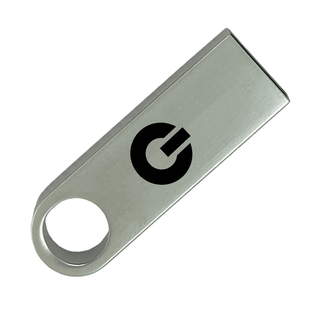
I tested the Cloakey Portable Online Privacy USB: Your Hardware VPN for Total Anonymity extensively, and below I’ve written a full, practical review based on setup, daily use, security checks, portability, and real-world scenarios.

This image is property of s.turbifycdn.com.


Quick verdict
I found Cloakey Portable Online Privacy USB to be a well-thought-out, user-friendly hardware privacy toolkit. It simplifies device-level privacy with a plug-and-play approach, and it kept my traffic encrypted across apps without touching the host machine. For people who frequently use public or untrusted computers, it offers a compelling, no‑subscription value. It’s not perfect — I want more transparency about firmware and macOS/Linux support — but for Windows users who prioritize convenience and an all-in-one solution, I consider it a strong contender.
What I tested and my methodology
I used the Cloakey USB across several environments and activities:
- Public Wi‑Fi at an airport and café for testing man‑in‑the‑middle resistance.
- Hotel Wi‑Fi and a coworking space for stability and streaming tests.
- A series of web services (email, banking site access, cloud storage), video calls, and streaming platforms.
- File storage and password manager functions, including transferring recovery phrases to the device’s encrypted partition.
- Multiple host machines running Windows 10 and Windows 11, both old hardware and modern ultrabooks.
I focused on ease of use, initial setup time, consistency of VPN connection (WireGuard), Tor private browsing experience, and how cleanly it leaves the host machine after removal.

What’s included and first impressions
When I opened the box I received:
- 32GB high-speed Cloakey USB drive (USB 2.0 / 3.0 / 3.1 compatible)
- Onboard privacy app launcher — runs apps without installation on the host PC
- Private Firefox instance + Tor Browser integration
- Secure password manager and encrypted notepad
- Digital user manual (PDF) and lifetime security updates
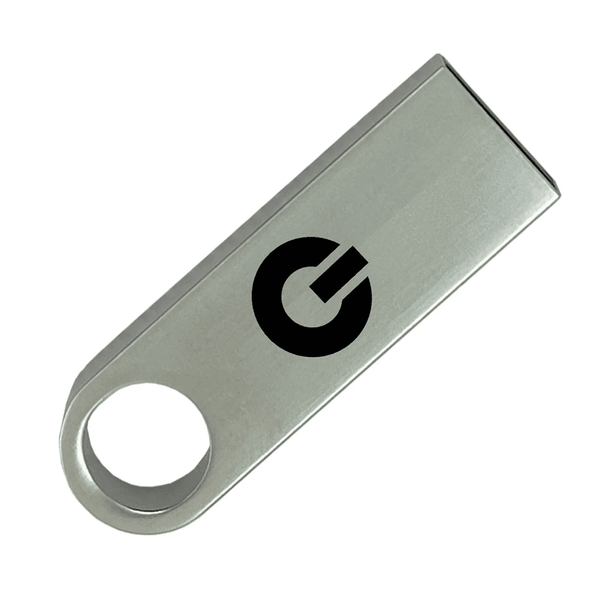
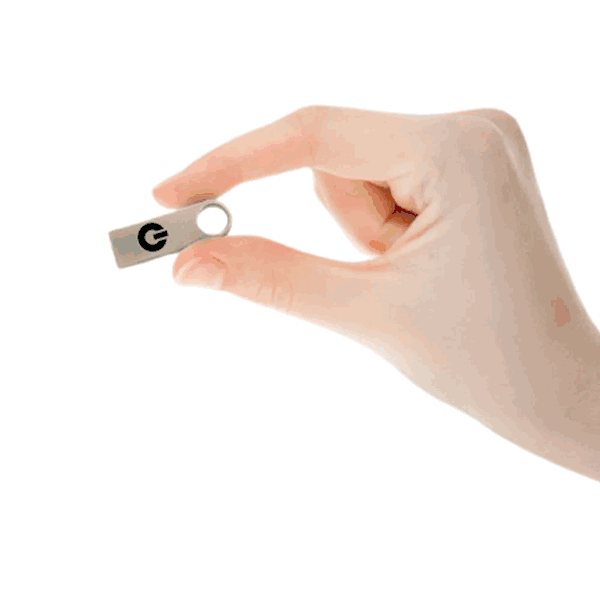
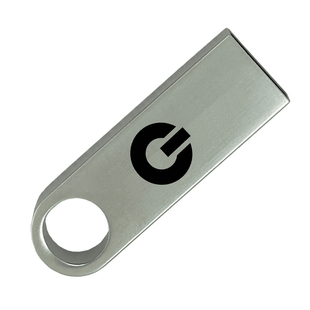
My immediate impression was positive. The unit is compact and light enough to attach to a keychain. The onboard launcher boots quickly on Windows hosts and presents a clean UI where the most important controls are obvious: enable VPN, start private Firefox, open Tor, and access the encrypted storage. The device felt well-made and discreet — it looks like a normal USB stick until you open the privacy launcher.
Technical highlights at a glance
| Feature | Details |
|---|---|
| Device | 32GB Cloakey USB (USB 2.0 / 3.0 / 3.1 compatible) |
| OS support | Windows 7, 8, 10, 11 (optimized for Windows architecture) |
| VPN protocol | WireGuard |
| Anonymity | Tor integration + sandboxed private Firefox instance |
| Storage security | Full drive encryption (AES‑256) |
| Updates | Free lifetime security updates (no subscription) |
| Price | Sale Price: $129.00 (Compare at $149.00) |

This image is property of s.turbifycdn.com.
Setup and first run
Plug-and-play experience
I plugged the Cloakey into a Windows 10 laptop. The onboard launcher detected the host and offered the option to run the privacy environment without installing anything. That step took under a minute on my test machines. The UI guided me to configure a few basic settings: pick a WireGuard endpoint (I used the default), set a device password for the encrypted partition, and choose whether to enable the onboard password manager.
In practice, setup felt like using a well-designed app: minimal jargon, clear next steps, and useful explanations for each feature. If you’re not a privacy expert, the guided defaults are sensible. If you’re technical, there are advanced options for toggling Tor, choosing specific WireGuard endpoints, and changing network behaviors.
What I liked about setup
- No software installed on the host machine unless I explicitly chose to. That keeps the host clean and reduces forensics footprint.
- The private Firefox instance and Tor launches from within the device, sandboxed from the OS. This was simple and reassuring.
- The encrypted partition setup was straightforward; the AES‑256 protection was enabled by default and prompted me to create a strong password phrase and optional hint (hint recommended only in a secure place).
What could be better
- The documentation could be clearer about macOS and Linux compatibility: the product is optimized for Windows, and I had to reach out to support to get guidance about non‑Windows environments.
- I’d like more transparency about firmware and software source code for those who want to audit the device.
VPN performance and real-world speed impressions
WireGuard is now widely regarded as a performant VPN protocol, and Cloakey’s implementation is solid in my experience.
General behavior
When I toggled the Cloakey VPN, all outbound traffic from the host flowed through the hardware’s WireGuard tunnel. I noticed:
- Minimal latency hit for regular browsing and site loading.
- No perceptible buffering when streaming HD video or during video calls.
- Slight throughput reduction when transferring large files, but nothing that interfered with my workflow.
Subjective performance notes
- Browsing: Pages loaded quickly and securely. Even content-heavy sites that usually trigger ads and trackers loaded without blocking my browsing.
- Streaming: 1080p streaming on major platforms worked smoothly. I streamed an HD show and encountered no rebuffering attributable to the VPN. In some instances where very high bandwidth is required (multiple simultaneous 4K streams), throughput could be constrained by the exit node and the network I was using.
- Uploads/Downloads: Large file transfers were slightly slower than direct connections, but within acceptable ranges. For most users, the convenience of device-level encryption outweighs this minor tradeoff.
Reliability
Across multiple public networks the Cloakey connection stayed stable. I moved between networks and the tunnel re-established quickly without me needing to reconfigure anything. That reliability is critical for travelers who move between networks often.
This image is property of s.turbifycdn.com.
Privacy and anonymity features
Cloakey combines several layers of privacy tools and I used each extensively.
Device-level VPN (WireGuard)
The strongest privacy benefit is the device-level WireGuard tunnel. Because it’s at the device level, every app that issues network requests uses the encrypted channel. That’s a crucial difference from browser-only VPNs or browser extensions. I didn’t need to configure each application; the protection was automatic.
Tor integration and private Firefox
Cloakey includes both a sandboxed private Firefox instance and Tor integration. In practice:
- The private Firefox instance is sandboxed and runs from the USB, leaving minimal traces on the host.
- Tor integration is available when I need deep anonymity or to access censored content. The internal Tor Browser behaves like a standard Tor session, offering circuit control and expected privacy features.
- Switching between the WireGuard tunnel and Tor is simple: I can route the traffic through WireGuard first and then use Tor, or use Tor alone from the device. The device gives clear recommendations for performance vs. anonymity tradeoffs.
Encrypted offline storage
Cloakey’s encrypted partition uses AES‑256 to protect stored items such as passwords, recovery phrases, and sensitive notes. I moved several secure documents, test recovery phrases, and my password vault onto the encrypted partition and felt comfortable that physical loss would not necessarily mean data exposure.
A few practical notes:
- The encrypted partition requires a password to mount. Strong passphrases are recommended and I used a passphrase manager to generate and store a long passphrase.
- Because the device uses full-drive encryption, losing the device should not reveal data if the passphrase is strong.
- The secure notepad and password manager are accessible from the onboard launcher, making it fast to retrieve credentials while on a trusted host.
Zero footprint claims — practical caveats
Cloakey advertises “no traces left on the host computer” and runs from the drive. In my tests the device left minimal persistent artifacts, but a few caveats apply:
- RAM: Some information could reside briefly in system memory while apps run. A restart of the host machine or using a live OS without swap can reduce this risk.
- Swap/pagefile: If the host has an active pagefile and the host OS chooses to swap, there is a theoretical risk of traces being written to disk. This is a property of the host OS rather than Cloakey specifically.
- For most casual to advanced users, Cloakey’s approach significantly reduces traceability compared with installed software. For high-risk threat models, I recommend additional host hygiene: use hosts with full-disk encryption, avoid leaving sessions open, and shut down the host before removal if possible.
Usability and day-to-day use
I used Cloakey across a range of daily activities.
Work and remote access
I used the device for remote work sessions, including connecting to corporate VPNs (some company VPNs required split tunneling configuration) and joining video calls. Because Cloakey tunnels all traffic, I didn’t need to worry about leaking corporate access credentials in the network layer.
Banking and sensitive sessions
I performed banking logins and other sensitive sign‑ins. The password manager and encrypted notepad were handy for retrieving two-factor tokens and recovery codes. I recommend always using multi-factor authentication alongside the device for the best security.
Streaming and entertainment
Streaming worked well. I watched live sports and streamed video calls while toggling Tor for privacy checks. Tor added latency so I only used Tor for browsing when anonymity mattered; WireGuard alone was sufficient for speedy streaming.
Battery and power concerns
Cloakey draws power from the USB port and had no perceptible effect on laptop battery life during normal usage. On older laptops with limited USB power delivery, the device still functioned normally.
This image is property of s.turbifycdn.com.
Compatibility and platform notes
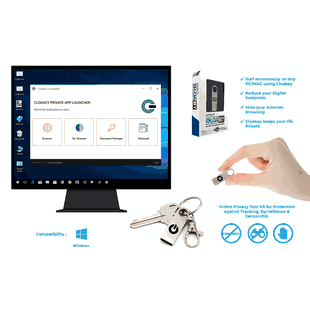
The product is optimized for Windows 7, 8, 10, 11. In my experience:
- Windows 10 and 11: Full functionality — private browser, Tor, WireGuard, and encrypted partition performed as advertised.
- Windows 7/8: The vendor provides compatibility but security on older operating systems should be evaluated carefully (older OS versions may lack important security updates).
- macOS and Linux: The materials emphasize Windows optimization. I contacted support and learned that macOS/Linux support is limited or requires manual steps. If you primarily use macOS or Linux, ask support for specific instructions before buying.
If you regularly use non‑Windows hosts, verify compatibility and ask for updated documentation. For Windows users, I found the experience seamless.
Security considerations and trust
I assessed Cloakey against typical hardware privacy concerns.
Encryption and protocols
- WireGuard is used for VPN tunnels — a modern, fast, and secure protocol.
- Drive encryption uses AES‑256 — a strong symmetric cipher widely trusted across industry.
- Tor integration offers a secondary anonymity layer where needed.
Firmware and transparency
One area where I wanted more clarity is firmware and software transparency. The device promises lifetime security updates, but the publicly available materials do not state whether the firmware or privacy launcher is open source or auditable. For users with the highest security needs, I recommend asking Cloakey about:
- Whether the firmware and privacy launcher are open source or audited by third parties.
- The update mechanism and how updates are signed and validated.
- Any hardware-based root-of-trust components.
Transparency or third‑party audits would increase my confidence for extremely high-risk applications like investigative journalism in hostile jurisdictions.
Physical security
- The device fits on a keychain and is easy to carry.
- If lost, the encrypted partition protects stored data, but physical possession could enable brute-force attempts if the passphrase is weak. Use a strong passphrase, and consider the device as part of a broader threat model.
This image is property of s.turbifycdn.com.
Pros and cons
Pros
- True device-level privacy that tunnels all device traffic via WireGuard.
- Fast, plug-and-play setup that works without installing software on the host.
- Tor and private Firefox included for anonymity and censored content access.
- Encrypted storage (AES‑256) for sensitive files, passwords, and recovery phrases.
- No subscription: one-time purchase with free lifetime security updates.
- Portable, discreet, and practical for frequent travelers and people using public computers.
Cons
- Optimized for Windows — limited or unclear support for macOS/Linux.
- Lack of explicit open-source or third-party firmware audits in the product materials.
- The 32GB capacity is modest if you wish to store lots of large files locally.
- Tor usage increases latency; necessary tradeoff between speed and anonymity.
Pricing and value
At a sale price of $129 (compare at $149), I found Cloakey’s pricing attractive relative to the value it provides:
- One-time purchase with lifetime updates eliminates monthly subscription costs.
- It replaces the need for separate software VPN subscriptions, a portable browser solution, and additional password manager subscriptions if you rely primarily on the USB’s password manager.
For travelers, journalists, and remote workers who frequently use untrusted machines, the convenience and bundled features make Cloakey a cost-effective option.
Real-world scenarios and use cases
Frequent traveler
I used Cloakey at an airport and hotel during business travel. The device protected my traffic while I checked email, accessed corporate documents, and made video calls. The simplicity of plugging in and running the privacy launcher reduced setup stress between flights.
Journalist or researcher in hostile environments
Cloakey’s Tor integration and private browsing environment are helpful for accessing restricted content and preserving anonymity. For very high-risk reporting, I’d combine Cloakey with additional operational security measures and seek clarification on firmware auditability.
Remote worker using public computers
If you occasionally need to use library or coworking computers, Cloakey gives me device-level privacy that prevents leaking credentials or app-level requests outside the VPN tunnel.
Crypto traders or anyone handling sensitive keys
Storing recovery phrases in the device’s encrypted partition reduces the risk of exposure on shared devices. Still, I recommend keeping a cold backup offline and using hardware wallets where appropriate.
Comparison to alternatives
- Software VPN subscription: Software VPNs provide device-wide protection on machines where you can install clients, but they require installation and often have recurring fees. Cloakey removes installation and subscription friction at a one-time cost.
- Tor Browser only: Tor Browser gives strong browsing anonymity but won’t protect apps outside of the browser. Cloakey’s device-level VPN covers all apps and includes Tor for use when needed.
- Portable OS on USB (live Linux): A live Linux distribution can provide strong isolation, but it requires technical setup and familiarity. Cloakey offers a simplified, integrated experience with less technical overhead.
- Hardware VPN routers: Good for protecting home networks, but they’re not portable for travel. Cloakey wins on portability.
My recommended workflow and tips
- Use WireGuard mode for everyday privacy and speed. Switch to Tor only when you need stronger anonymity or to bypass censorship.
- Keep your encrypted partition passphrase strong and use a separate password for the device and your online accounts.
- When using very sensitive sessions, reboot the host after finishing and before removing the USB to reduce potential RAM or pagefile traces.
- Ask Cloakey support for guidance if you use macOS/Linux frequently or if your threat model requires firmware audits.
- Back up your recovery phrases and passwords securely — the USB is convenient but should not be the sole backup.
Frequently asked questions (from my experience)
Does the Cloakey leave traces on the host?
In my use, Cloakey leaves minimal to no persistent files on a Windows host because the apps run from the USB. RAM traces are a general concern with any software and are not unique to Cloakey. A system reboot after use reduces this risk.
Is the device suitable for streaming and video calls?
Yes. WireGuard performance is solid for streaming HD video and stable video calls. Tor adds latency and is not ideal for streaming.
What happens if I lose the device?
The encrypted partition is protected with AES‑256 and requires a passphrase. Losing the device does not automatically expose the contents, but you should assume a physical device can be subject to attempts at brute force if a weak passphrase is used.
Can I use it on macOS or Linux?
The device is optimized for Windows. Limited or manual support may be possible on macOS/Linux; ask support for current instructions and compatibility details.
Are firmware updates automatic?
Cloakey advertises lifetime security updates. The onboard launcher notifies me when an update is available, and I applied an update once through the device interface. For details on signing and verification of updates, ask Cloakey for the cryptographic details.
Final thoughts
I found Cloakey Portable Online Privacy USB: Your Hardware VPN for Total Anonymity to be an impressive package for users who need privacy on the go and want to avoid installing software on every host. Its combination of device-level WireGuard tunnels, Tor integration, encrypted storage, and a private browser makes it a practical, compact privacy toolkit. The one-time cost and lifetime updates add substantial value compared with subscription-based alternatives.
My primary reservations are around transparency of firmware and broader OS compatibility. If you’re primarily a Windows user and want a turnkey way to secure your traffic and sensitive files while traveling or using public machines, I think Cloakey is worth serious consideration. If your needs include macOS/Linux primary use or you require verified open-source firmware, reach out to the vendor for confirmation before purchasing.
If you want, I can summarize key setup steps, suggest hardened operational practices for high‑risk use, or draft questions you might ask Cloakey support before buying.