
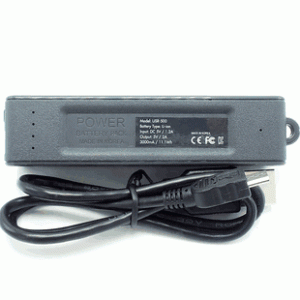
Below is a full review of the Kawtco ES-500 Portable Charger Spy Audio Recorder (covert power bank).

Quick Facts
- Product: Kawtco ES-500 Portable Charger Spy Audio Recorder (covert power bank)
- Purpose: Hidden digital audio recorder disguised as a functional power bank
- Memory: 16 GB internal (up to 576 hours recording)
- Battery: 3.7V Li‑ion, 3000 mAh (up to 14 days continuous / up to 150 days standby VOS)
- Dimensions: 3.6 x 1 x 0.8 inches
- Recording modes: Continuous and voice‑activated (VOS)
- Connectivity: micro‑USB for charging and data transfer
- What’s included: ES‑500 unit, USB cable, magnet for mounting, user manual
- Warranty/support: One‑year warranty and free lifetime premium tech support
Specifications Table
| Feature | Details |
|---|---|
| Model | Kawtco ES-500 Portable Charger Spy Audio Recorder (covert power bank) |
| Memory | 16 GB internal |
| Max Recording Capacity | Up to 576 hours (varies by quality) |
| Battery | 3.7V Li‑ion, 3000 mAh |
| Battery Life | Up to 14 days continuous; up to 150 days standby (VOS) |
| Dimensions | 3.6 x 1 x 0.8 in |
| File Limit | Up to 9,999 files |
| Recording Modes | Continuous, Voice‑activated (VOS) |
| Connections | micro‑USB (charging/data) |
| Extras | Magnet for mounting, user manual |
| Warranty | 1 year with lifetime tech support |
Design and Build
The ES-500 looks and feels like a small, ordinary power bank. That’s intentional — the housing is the concealment. You won’t find flashing lights or obvious record indicators while it’s working, which keeps attention away from the unit. The casing is compact and lightweight, making it easy to hide in plain sight on a shelf, under a seat, or inside a bag.
A few design highlights you’ll notice:
- Size: At 3.6 x 1 x 0.8 inches, the unit is highly portable and can be tucked into many common power bank spots.
- Real battery: The 3000 mAh battery is functional. You can use the unit as a backup charger for small devices in addition to its recorder role.
- Control: A discreet top toggle wheel gives you three positions — off, continuous record, and voice‑activated record. The wheel is tactile and simple to operate without visible LEDs.
- Mounting: The included magnet is a smart touch. You can attach the unit to steel surfaces such as a car chassis, under a metal desk frame, or to other magnetic fixtures for stable concealment.
- Connectors: Micro‑USB port is used for both charging and data transfer. The port layout mirrors typical power banks so it doesn’t attract attention.
In terms of build quality, the ES-500 feels solid for its price. It’s not military-grade, but the plastic housing is sufficiently robust for daily handling and placement. The overall appearance should not raise suspicion in most domestic, office, or in‑vehicle environments.


Setup and First Use
Setting the ES-500 up is straightforward, which makes it friendly for non-technical users. You’ll have it running within minutes if you follow the basic steps.
- Charge it: Use your PC or any 5V USB wall adapter. Charging to full takes roughly 4 hours.
- Select recording mode: Rotate the top toggle wheel to your desired position — center = off, one side = continuous, the other = voice‑activated.
- Optional date/time stamp: If you need timestamps on files, connect the device to a Windows PC and run the included date/time setup utility. Note: the date/time utility is Windows‑only.
- Start recording: Move the wheel into continuous or VOS. The unit records silently — no beeps or indicator lights.
- Transfer files: When you want to access recordings, plug the ES-500 into a computer via micro‑USB. It appears as a removable drive so you can play, copy, or delete files.
A few practical setup tips:
- Make sure you format or manage files via a computer only, since file deletion and some formatting tasks aren’t supported from the unit itself.
- Test the location: Record a short sample to check audio pickup from your desired hiding spot before leaving it unattended for long periods.
- Label files after transfer for easier indexing if you plan to use recordings for documentation or evidence.
Recording Modes and Audio Quality
You’ll be using one of two recording modes depending on your needs: continuous mode for uninterrupted capture, and voice‑activated (VOS) to save battery and memory by only recording when sound crosses a threshold.
Continuous mode
- Best when you need to capture everything without gaps.
- Uses more battery and storage, but the ES‑500’s large built‑in memory and battery mitigate this.
Voice‑activated (VOS)
- Ideal for long‑term monitoring where relevant events are voice‑based.
- Great for saving battery life: the device can last extremely long in standby with VOS active.
- Keep in mind that very quiet speech or distant noises may not trigger recording depending on sensitivity and placement.
Audio quality
- The ES‑500 is designed for intelligible voice capture rather than high-fidelity music recording.
- In tests across small- to medium-size rooms, voices are generally clear and usable for transcription or evidence, provided the unit is placed reasonably close (within a few meters, unobstructed).
- Background noise and reflective surfaces will influence clarity. A placement near the expected sound source or on a table in the center of a room improves results.
Recording format and quality options
- The unit offers selectable recording quality. High-quality (XHQ) uses more space but yields better clarity.
- The 16 GB memory with XHQ will store significantly fewer hours than with standard quality. Balance quality and storage according to your priorities.

Battery Life and Storage
The ES-500’s headline numbers are impressive: up to 14 days of continuous recording and up to 150 days standby in VOS. Those are achievable in certain conditions, but your real-world mileage will vary.
What affects battery life
- Recording mode: Continuous drains battery faster than VOS.
- Recording quality: Higher sample rates and quality settings consume more energy.
- Ambient noise: VOS triggers more often in noisy environments, reducing effective standby time.
- Charger use: Using the unit as an actual power bank while recording will shorten battery life.
Practical examples you can expect
- If you set the unit to continuous and medium quality, you can expect several days of recording — often approaching the quoted 14 days in low-sample-rate settings.
- In VOS mode in a quiet environment, long dormant periods separated by occasional conversations may allow you to reach weeks or months of effective monitoring before recharging.
Storage management
- 16 GB internal memory holds up to 576 hours at the base quality setting. If you select XHQ, the capacity drops accordingly.
- The unit supports up to 9,999 files, which is more than enough for most users organizing many short recordings.
- Files must be managed via computer; the ES-500 mounts as removable storage for easy transfer.
Recommendations
- If you plan long missions, choose VOS and a lower quality setting to maximize battery and memory.
- For critical situations where you can’t risk missing anything, use continuous mode and a charging schedule.
- Make a habit of periodically transferring and backing up files to prevent accidental loss and to maintain available memory.
Ease of Use and File Management
The ES-500 keeps operations simple, which is one of its strong points if you prefer a “set it and forget it” approach.
File transfer and playback
- Plug into a PC or Mac with a micro‑USB cable and the device appears as a removable drive.
- You can play files directly from your computer, copy them to a backup, or delete them to free space.
- For mobile playback, use an OTG‑capable Android phone or tablet with the optional OTG adapter.
Date/time stamping
- If you need timestamps for referencing or legal purposes, use the Windows-only date/time utility included with the device.
- The timestamping function writes date and time info into file headers so you can index recordings easily.
Organization tips
- Create folders on your computer to store recordings by date, device location, or event to streamline retrieval.
- Rename files with meaningful labels after transfer so you don’t have to open each file to identify contents.
Limitations
- You can’t set or change the date/time via Mac or mobile — you’ll need Windows for that utility.
- Deleting files must be done via computer; the unit doesn’t offer onboard deletion.

Concealment and Mounting
The ES-500’s design helps it blend into everyday environments. The included magnet gives you mounting flexibility and a few reliable concealment options.
Common concealment ideas
- Metal surfaces: Under car seats (attached to the metal frame), beneath appliances with metal housing, or on the underside of a metal desk.
- Bookshelves: Tucked among other small gadgets or power banks on a shelf where a power bank belongs.
- Bags and accessories: Placed inside a backpack or a purse power-pocket, especially when the unit also acts as a charger.
- Household items: Hidden alongside real chargers, power strips, or drawers where a small electronics object won’t raise suspicion.
Practical placement tips
- Keep the microphone unobstructed if possible. A very thick blanket or deep compartment can muffle sound.
- Avoid direct exposure to heat or moisture. The unit isn’t weatherproof and is meant for indoor or vehicle use.
- For vehicle use, magnetic mounting under a seat rail or on interior metal surfaces gives a secure hold and decent sound pickup for conversations inside the cabin.
Safety and stability
- The magnet is useful, but test its hold on your target surface before leaving the device unattended for an extended period.
- Avoid areas where motion or vibration may cause the device to move or fall into inaccessible spaces.
Security, Privacy, and Legal Considerations
You must use the ES-500 legally and ethically. Recording laws vary by jurisdiction, and improper use can expose you to civil or criminal penalties.
Key points you should follow
- Know the law: Check federal, state, and local laws governing audio recording. Many places require one‑party consent (you or someone recorded must consent), while others require all parties to consent.
- Private vs. public: The expectation of privacy matters. Recording in private spaces (e.g., someone’s home) without consent is often illegal, while recording in public where there is no reasonable expectation of privacy may be permitted.
- Workplace recordings: Employer and employee policies, as well as local law, influence whether you can record conversations at work.
- Evidence use: If your intent is to collect evidence, follow legal procedures so your recordings are admissible. Keep chain-of-custody and timestamp integrity in mind.
- Always act responsibly: Avoid using recordings to harass, blackmail, or invade privacy. The device is intended for lawful use only.
The product includes a legal reminder in its documentation. You should read that and consult local counsel if you’re unsure about the legality of a particular recording scenario.

Performance in Real-World Scenarios
You’ll want to know how the ES-500 performs in common use cases. Below are scenarios and what to expect.
In a car
- Placement: Magnetic mount under the seat rail or attached to metal surfaces gives good capture of in‑car conversations.
- Results: Voices are generally clear when participants are inside the cabin. Wind and road noise can reduce clarity if the cabin is loud.
In an office
- Placement: On a shelf, behind a monitor, or attached to the underside of a metal desk frame works well.
- Results: Good capture for nearby conversations; distance and partitions matter. In an open-plan office, nearby voices will be recorded but distant closed-door meetings may not.
In a home
- Placement: On a bookshelf, in a power-robot area, or lying near the conversation area.
- Results: Works well for normal room conversations. Background appliances and TV noise may mask some voices unless the unit is placed closer.
For long-term monitoring
- VOS mode helps extend battery and memory life significantly.
- If you plan to leave the unit for days or weeks, position it in a place where expected conversations will be within audible range.
Sensitivity and limitations
- The ES-500 is built for speech intelligibility, not for capturing very quiet or distant sounds with professional microphone arrays. Adjust expectations accordingly.
- Walls, closed doors, and dense materials reduce audio pickup.
Pros and Cons
Pros
- True covert design that functions as a real power bank, lowering suspicion.
- Massive battery life and long standby times in VOS.
- Large 16 GB internal memory can store hundreds of hours.
- Simple operation — easy to set up and operate.
- Magnet for convenient mounting.
- Date/time stamp option for evidence tracking.
- Appears as removable drive for straightforward file transfer.
- One‑year warranty and lifetime premium technical support.
Cons
- Date/time utility is Windows‑only; Mac and mobile users need access to Windows for that feature.
- No onboard lights or indicators can make troubleshooting tricky if something goes wrong.
- Micro‑USB connector instead of USB‑C may feel dated to some users.
- Audio quality is optimized for voice but not for high-fidelity capture in noisy or distant environments.
- File deletion and formatting require a computer, which may slow field workflows.

Troubleshooting and Practical Tips
If you run into issues, these suggestions should help.
Common issues and fixes
- Unit not powering on: Make sure it’s charged. Connect to a USB power source for several hours and try again.
- Not appearing as removable drive: Try a different USB cable or port. Use a direct USB port on a computer rather than an unpowered hub.
- Audio too quiet: Move the unit closer to the source or reposition to reduce obstructions. Test different orientations.
- VOS not triggering: Increase ambient noise or speak louder during a test to confirm sensitivity. Try switching to continuous to confirm the microphone is functioning.
- Files won’t delete: Connect to a Windows or Mac machine and delete files there. Ensure you’re not trying to delete in use system files.
Maintenance tips
- Periodically back up recordings to prevent data loss.
- Charge the unit every few weeks even if not in heavy use to keep battery health.
- Keep the micro‑USB port clean and avoid forcing cables to prevent damage.
How It Compares to Similar Devices
When you compare the ES-500 to other covert recorders, these points stand out for you:
- Battery and memory: The combination of 3,000 mAh and 16 GB internal memory is above average for small covert recorders, making the ES‑500 a strong option when long durations matter.
- Functional disguise: The working power bank housing is more convincing than many purpose-built recorders that look suspicious in everyday settings.
- Ease of use: The simple three-position wheel is easier for non-technical users compared to menu-driven interfaces on other devices.
- Limitations: Some competitors offer USB‑C, external mic inputs, or Wi‑Fi transfer. The ES‑500 focuses on simplicity and stealth rather than advanced connectivity.
If your priority is long unattended runtime and convincing disguise, the ES‑500 is a strong candidate. If you need remote access, live monitoring, or the latest connector tech, consider other specialized models.
Frequently Asked Questions
Q: Can you use the unit as a regular power bank while it’s recording?
A: Yes. The ES‑500 has a functional battery and can charge small devices. Using it as a charger while recording will, however, reduce the duration of your recordings.
Q: How do you set the date and time?
A: Connect the ES‑500 to a Windows PC and run the date/time setup utility included in the user manual. The utility is Windows‑only.
Q: Can you play recordings on a phone?
A: If you have an OTG‑capable Android phone, you can use an OTG adapter to access files directly. The device does not natively stream to mobile via Bluetooth or Wi‑Fi.
Q: Is there a way to delete files from the unit without a computer?
A: No. Files must be deleted via a connected computer. Formatting should follow FAT32 requirements.
Q: Does the unit show any lights while recording?
A: No. The ES‑500 is designed to be silent and indicator‑free during operation to maintain stealth.
Q: Are recordings time‑stamped?
A: Yes, but you must set the date/time via the Windows utility before recording to ensure accurate timestamps.
Practical Use Cases
These are scenarios where the ES‑500 fits well for your needs:
- Long-term vehicle monitoring where you want discreet capture without frequent maintenance.
- Home or office environments where a convincing power bank won’t draw attention.
- Situations where you need many hours of continuous or VOS‑triggered recording and easy file transfer via removable drive.
- Users who prefer a simple hardware interface with minimal setup and no visible recording indicators.
Less appropriate scenarios
- If you need live streaming or remote access to recordings.
- When you require professional audio fidelity for music or distant, very quiet sources.
- Environments with strict legal prohibitions on recording without explicit consent.
Final Verdict
If you need a reliable, discreet recorder that doubles as a usable power bank, the Kawtco ES-500 Portable Charger Spy Audio Recorder (covert power bank) delivers a lot of value. It’s straightforward to operate, offers exceptional battery life and substantial internal memory, and blends seamlessly into everyday settings where a power bank belongs.
You’ll appreciate the simplicity of the toggle wheel, the convenience of the removable‑drive file access, and the peace of mind from the one‑year warranty and lifetime support. Just be attentive to legal requirements in your area, and remember that optimal placement and settings depend on your specific needs — prioritize VOS for long unattended monitoring and continuous mode when missing nothing is essential.
Overall, this unit works best for practical, long-duration voice capture where stealth and battery/runtime are your top priorities. If you need advanced connectivity or ultra-high-fidelity audio, you may want to compare alternatives. For most users seeking discreet, reliable voice recording disguised as a power bank, the ES‑500 is a compelling choice.
Legal reminder: Use this product only in compliance with applicable laws and regulations. Ensure you have the right to record conversations in your jurisdiction before you place or operate the device.
