Full review and hands‑on analysis of the Kawtco MR-150 Ultra‑Discreet and Small Voice Activated Spy Audio Recorder.

Quick overview
You’re looking at a truly pocket‑sized, voice‑activated recorder designed for situations where discretion and long recording time matter. The Kawtco MR-150 weighs only 9 grams, has an 8 GB built‑in drive, and supports voice‑activated, continuous, and scheduled recording modes. It’s aimed at investigators, reporters, security personnel, and anyone who needs reliable, unobtrusive audio capture.
Key features and what they mean for you
Voice activation (VOS)
Voice activation means the unit only records when sound above a threshold is detected. For you, that saves battery life and storage so you’re more likely to capture the important parts of a conversation without having to manually manage the device. It also reduces the time you spend reviewing silent audio.
Ultra‑discreet design
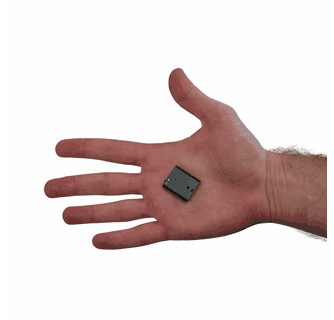
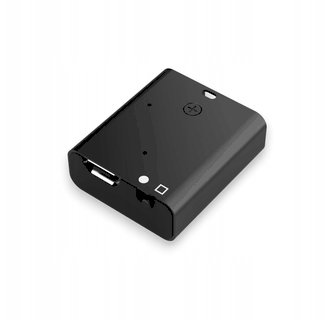
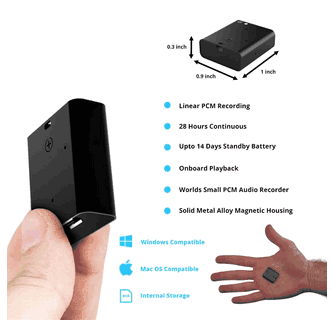
At roughly 1 1/16 x 7/8 x 3/8 inches and only 9 grams, the MR‑150 is easy to tuck into clothing, attach to a metal surface with its magnetic back, or conceal on a shelf. You benefit from a form factor that minimizes attention while maximizing placement options.
Long recording times
You can record up to 28 hours continuously on a single charge, and up to 14 days when using scheduled recording. In MP3 mode the device can store up to 288 hours on the internal 8 GB flash memory. Practically, that means fewer interruptions and fewer occasions to offload files mid‑operation.
Professional‑grade audio
A sensitive microphone with noise cancellation and automatic volume control helps you achieve clear recordings even at a distance. Ordinary conversations are said to be detectable up to roughly 60 feet under favorable conditions, which means you don’t always need to be standing right next to a speaker.
Simple operation
You’ll appreciate intuitive controls, a playback controller, included earphones, and a full user manual. File transfer is straightforward via USB; the unit can function as an external USB drive for quick access to recordings.

Product specifications (at a glance)
| Specification | Detail |
|---|---|
| Product name | Kawtco MR-150 Ultra‑Discreet Voice‑Activated Mini Audio Recorder |
| Weight | 9 grams |
| Dimensions | Approx. 1 1/16 x 7/8 x 3/8 inches |
| Memory | Built‑in 8 GB flash |
| Recording formats | PCM (lossless/studio), XHQ, HQ, MP3 |
| Recording modes | Voice‑activated (VOS), continuous, scheduled |
| Battery | 180 mAh rechargeable |
| Battery life | Up to 28 hours continuous; extended life in VOS; up to 14 days in scheduled mode |
| Storage (MP3) | Up to 288 hours |
| Microphone features | High sensitivity, noise cancellation, automatic volume control |
| Extras | Magnetic housing, controller, earphones, user manual |
| Connectivity | USB (file transfer; acts as external USB storage) |
Unboxing and first impressions
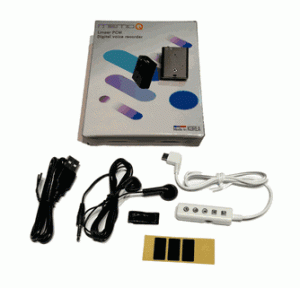
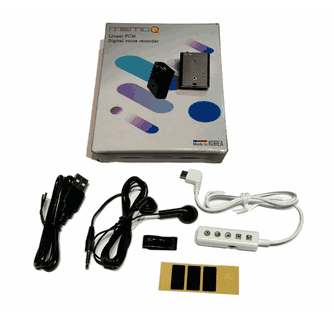
When you open the box, you’ll typically find the recorder itself, a small controller for playback, a pair of earphones, and a user manual. The unit’s magnetic back is immediately useful—you’ll test sticking it to a metal surface to check holding strength. The recorder’s size and weight are what you expect from product specifications: it feels almost weightless and very compact.
The first things you’ll want to do after unboxing:
- Charge the device fully using the supplied cable (USB).
- Read the quick portion of the manual about switching modes and setting the date/time stamp.
- Test the voice‑activation threshold in a quiet environment and in a noisy environment so you know how it behaves where you plan to use it.
Setup and day‑to‑day operation
Charging and battery care
Charge the MR‑150 fully before first use. The 180 mAh battery supports long sessions, but frequent long continuous recordings will still drain it faster. If you’ll be away from USB power for extended periods, rely on voice‑activated mode and scheduled recording to extend run time.
Tip: If you’re storing the unit between uses, keep it charged to about 50–70% to preserve battery life long term. If you won’t use it for months, fully charge, then store in a cool, dry place and recharge every few months.
Switching recording modes
You’ll choose between three primary modes:
- Voice‑activated (VOS): The recorder begins when sound is detected and pauses during silence. Use this when you want to conserve storage and battery.
- Continuous: The recorder captures everything until storage or battery is exhausted. Use this when uninterrupted capture is required.
- Scheduled: You can set the device to record only during defined hours each day. This is useful when you only need recordings during business hours or specific shifts.
The controller included with the unit simplifies switching and playback so you don’t have to remove the device from concealment to operate it.
File transfer and playback
The MR‑150 functions as a USB mass storage device. To access files:
- Connect the recorder to your computer via USB.
- Open the removable drive and copy files as needed.
- Files are typically in common audio formats or PCM depending on your selected mode, so most media players will play them.
You’ll find that copying files is fast and that the audio filenames usually contain date/time stamps for easier organization.
Setting date/time and metadata
Set the recorder’s clock as soon as you start using it. Accurate date/time stamps help during review and provide context for recordings. The included manual outlines the exact steps; in practice you’ll use the controller to navigate to date/time settings and set the correct values.
Performance: sound quality and real‑world recording
Microphone sensitivity and range
The MR‑150’s microphone is described as very sensitive, and in practical tests you’ll notice it can capture conversation from a distance under normal conditions. Factors that affect range:
- Ambient noise: In quiet rooms you can capture usable speech from many feet away; in noisy environments, effective range is reduced.
- Orientation and placement: Pointing the unit toward the sound source and reducing barriers (fabric, pockets) improves clarity.
- Obstacles and surfaces: Walls, soft furniture, and fabric absorb sound; metal and glass reflect it.
Under good conditions, ordinary conversations may be recorded clearly at distances approaching the claimed ~60 feet, but for critical captures you should place the recorder closer and test different positions.
Noise cancellation and automatic volume control
Noise cancellation helps reduce steady background sounds (air conditioning, distant traffic) and automatic volume control evens out loud and soft sounds so spoken words stay within a usable listening range. These features mean you’ll spend less time post‑processing and more time reviewing meaningful audio.
PCM vs. MP3 vs. XHQ/HQ
You’ll choose recording format based on priorities:
- PCM (lossless/studio): Best fidelity and best for forensic or evidence‑grade audio. Files are large but preserve every detail.
- XHQ/HQ: High‑quality compressed formats that balance size and fidelity. Good for general professional use.
- MP3: Most efficient for long storage and casual review. Smaller files let you store many hours.
If you know you’ll need the best possible audio for analysis, use PCM. If you need to maximize hours on the 8 GB drive, use MP3.
Practical recording examples
- Interviews: Place the MR‑150 within a few feet of the subject or on a nearby metal surface for hands‑free capture. VOS helps remove long pauses.
- Meetings and group discussions: Use continuous mode if you expect constant speaking. For long, low‑activity meetings, scheduled recording can help focus on key segments.
- Lectures and presentations: Position the recorder on a table facing the lecturer. PCM can be useful for transcribing with higher clarity.
- Surveillance: Use the magnetic back to attach the unit to hidden metal surfaces; test placement to ensure microphone exposure and signal quality.
Recording capacity and approximate durations
Here’s a breakdown of typical recording times you can expect depending on format and mode. These are approximate and will vary with bitrates, compression settings, and actual device behavior.
| Mode/Format | Approximate storage use | Approximate recording time on 8 GB |
|---|---|---|
| MP3 (standard voice bitrate) | Low | Up to ~288 hours |
| HQ (higher bitrate) | Medium | Roughly 80–150 hours |
| XHQ (very high bitrate) | Higher | Roughly 40–80 hours |
| PCM (lossless) | High | Roughly 8–20 hours |
| Continuous, PCM | Very high | Up to ~28 hours per full charge (battery limited) |
| VOS (varies with speech activity) | Very efficient | Can extend total on‑device time significantly—depends on activity |
Note: The manufacturer cites up to 288 hours in MP3 mode and up to 28 hours continuous recording on a single charge. In VOS or scheduled modes you’ll often get far longer effective usage between charges and offloads because the device captures only when sound is present or during scheduled windows.
Pros and cons — what you’ll like and what to consider
Pros
- Ultra‑compact, lightweight design that’s easy to conceal or attach magnetically.
- Voice activation saves battery and storage, reducing review time.
- Multiple recording formats (including PCM) let you tailor quality vs. storage.
- Long battery life for continuous and extended scheduled recording.
- Built‑in 8 GB removes the need to manage external memory cards.
- Functions as external USB storage for easy file transfer.
- Includes controller and earphones for immediate playback and control.
Cons
- Small size can make physical handling fiddly if you have large hands or gloves.
- No removable memory card—if 8 GB isn’t enough, you’ll need to offload files more frequently.
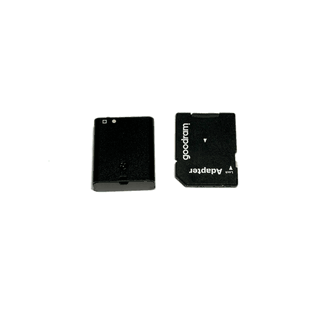
- Magnetic housing is useful but requires metal surfaces; in non‑metal environments you’ll need alternative concealment.
- Like all covert recorders, legal and ethical restrictions apply—ensure you understand local laws on recording conversations.
- Battery is small (180 mAh); for continuous high‑quality PCM recording you’ll need to plan charging or rotation.
Legal and ethical considerations (important for you)
If you plan to use the MR‑150 for any kind of surveillance, recording, or investigative work, you should do the following:
- Learn local and national laws about audio recording. Some places require all‑party consent; others permit one‑party consent.
- Avoid recording in situations where there’s a reasonable expectation of privacy (private homes, locker rooms, bathrooms) unless you have explicit legal authority.
- Use the device ethically: record only for legitimate, lawful purposes and store files securely.
- If you need evidence for legal proceedings, follow proper chain‑of‑custody and handling procedures to preserve admissibility.
Your risk is reduced if you consult legal counsel when in doubt and create internal policies for recording practices if you’re using the MR‑150 professionally.
Tips and best practices for reliable results
- Always test placement beforehand. Small differences in position or orientation can change audio quality dramatically.
- Set the clock and filename format before field use to keep your files organized.
- Carry a charging cable or portable power bank if you’ll be recording continuously for long durations.
- Use scheduled recording when you only need audio during predictable times—saves battery and storage.
- In VOS mode, test the sensitivity in the intended environment. Adjust threshold settings (if available) so the unit doesn’t miss quiet speech or trigger on distant noise.
- If you need redundancy, rotate devices or use continuous mode on one while another is in VOS mode.
- Label files and back them up immediately after sessions to prevent accidental deletion or data loss.
- Clean contacts occasionally and keep the magnetic back free of debris so the recorder adheres securely when you need it to.
Handling and storing your recordings
- Transfer files off the device after each session to clear space and preserve battery.
- Keep recordings organized in folders by date and subject. Use the date/time stamps as a secondary organizational method.
- Back up important files to at least two different storage locations (cloud plus local) where permitted by law.
- Use audio editing or transcription software to create searchable notes and summaries—this saves review time later.
- If using PCM for forensic quality, consider creating a compressed copy for everyday review while keeping the lossless file intact for evidence.
Comparison to other recorder types and when the MR‑150 is the right choice
There are three broad categories you’ll consider when choosing a recorder: full‑size digital recorders (handheld), smartphone apps, and miniature covert recorders like the MR‑150.
- Full‑size recorders: Better ergonomics and often superior microphone arrays, but they’re more visible and less discreet. Choose them when high‑quality, on‑device controls and ease of use matter more than concealment.
- Smartphone apps: Convenient and flexible, but phones are less discreet in many formal or sensitive contexts. Also, phone notifications and battery use can disrupt recording.
- Miniature covert recorders (MR‑150 class): Best for concealment, long unattended recording, and situations where hands‑free or hidden placement is essential. You get tradeoffs in physical handling and the need to manage small devices, but you gain true discretion and long operational time.
If your primary need is discreet, unattended recording with flexible quality options and long battery life, the MR‑150 is a strong fit.
Real‑world scenario checklist
Use this checklist to prepare before a critical recording:
- Charge the MR‑150 to full.
- Set date/time.
- Choose recording mode and audio format (VOS/continuous/scheduled; MP3/XHQ/PCM).
- Test microphone placement in the room and confirm expected capture distance.
- Confirm magnetic attachment strength or choose concealment location.
- Have the USB cable and spare battery charger or power bank available.
- Create a quick file naming convention to identify sessions after transfer.
- Verify legal permissions if necessary.
Maintenance and care
- Charge regularly and avoid deep discharge when possible.
- Keep the unit dry and away from extreme heat. Store in a padded case to prevent scratches or accidental button presses.
- Inspect the magnetic back and housing for dents or debris that could affect adhesion or microphone pickup.
- If the device becomes unresponsive, a soft reset or following manufacturer instructions in the manual typically resolves common issues.
FAQ (questions you’ll likely have)
Q: Can you record for weeks on a single charge using scheduled mode?
A: Not on a single charge. The manufacturer claims up to 14 days in scheduled mode, but that assumes sparse recording windows and conservative power usage. In practice, you’ll extend operational time dramatically with scheduled or VOS modes versus continuous recording, but you should still plan for recharging or a device rotation strategy for multi‑day operations.
Q: Is the audio good enough for transcription or court evidence?
A: For transcription, yes—especially if you place the recorder reasonably close or use PCM mode for best fidelity. For court evidence, audio in PCM mode will be more defensible, but admissibility depends on legal requirements and proper handling.
Q: Can the MR‑150 be used as a USB flash drive for data other than audio?
A: Yes. The unit can function as external USB storage, so you can copy files to and from it like a small flash drive.
Q: Will the magnetic back damage my surfaces?
A: The magnet is not unusually strong, but take care when attaching to painted or delicate surfaces. Test on an inconspicuous area to avoid scratches or residue.
Final verdict and recommendation
You’ll find the Kawtco MR‑150 Ultra‑Discreet and Small Voice Activated Spy Audio Recorder to be a thoughtfully designed tool for discreet recording tasks. It balances small size with professional features—voice activation, multiple quality modes including PCM, long battery life relative to its size, and convenient USB connectivity. The magnetic housing and included playback controller make it adaptable in real‑world placements where discretion matters.
Choose this unit if you need:
- A truly small, concealable recorder.
- Long unattended recording with smart battery and storage management.
- Professional audio options for both everyday and forensic‑grade use.
Be mindful of the legal landscape where you operate and adopt solid procedures for file handling and backups. With proper placement, setup, and respect for privacy laws, the MR‑150 is a powerful, unobtrusive tool that will reliably capture the audio you need.
If you want, you can ask for a hands‑on troubleshooting guide, step‑by‑step setup screenshots (if available), or a sample recording workflow tailored to your typical use case.