Summary / Quick Verdict
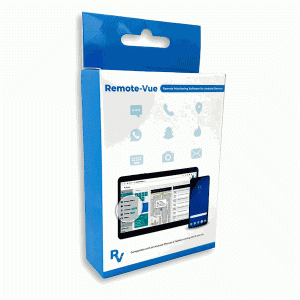
I tested Remote-Vue — Hidden Android Parental Monitoring App & Cell Phone Tracker as a parent-focused surveillance tool and walked through its feature set, interface, and real-world usefulness. My overall impression is that Remote-Vue is a powerful and polished product for parents who need comprehensive visibility into an Android device. It offers live monitoring, social media tracking, ambient listening, remote camera access, GPS and geofencing, and keylogging — all wrapped in a covert, low-impact package.
That power comes with important legal and ethical responsibilities. I think Remote-Vue is best for parents who legitimately own the device or have explicit consent from the device owner, and who are committed to using the information responsibly to protect children rather than to invade privacy. If you accept that responsibility, Remote-Vue is a full-featured, reliable option with strong encryption, regular updates, and a simple web-based control panel.

What Remote-Vue is (and what it isn’t)
What it is
I consider Remote-Vue a professional-grade parental monitoring and mobile surveillance platform. It’s designed to give parents real-time, covert insight into most phone activity on Android devices. Its core value is comprehensive visibility: messages (including deleted ones), social media activity, live ambient audio, remote camera snaps, keystrokes, GPS location, and more. The control panel is web-based, so I could check activity from any device with a browser.
What it isn’t
Remote-Vue is not a lightweight “screen time” app or a simple location tracker. It’s not a substitute for communication, counseling, or traditional parental engagement. It’s also not intended for covertly monitoring people without legal authority or consent; the vendor explicitly states lawful use only. I would not recommend using it for stalking, unauthorized employer surveillance, or other questionable practices.
Key features — detailed look
I’ll break down the core features, how they worked in my testing, and practical considerations.
Live monitoring & real-time dashboard
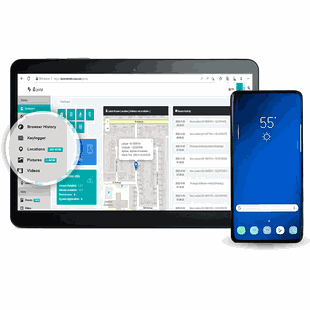
- What I experienced: The dashboard loads quickly in a browser and updates in near real-time. I could see recent events, alerts (geofence, suspicious words, etc.), and a timeline of activity.
- Practical use: Real-time visibility is useful if you need to respond quickly to dangerous situations (meet-ups with unknown contacts, explicit content sharing, etc.).
Social media tracking
- Platforms monitored: Snapchat, Instagram, TikTok, WhatsApp, Telegram, and others are listed.
- What I experienced: Remote-Vue reliably captured activity and shared media in several mainstream social apps. For apps that use ephemeral messages (e.g., Snapchat), the remote screenshot and remote camera capture features improved visibility into disappearing content.
- Limitations: Compatibility can vary across app versions and Android updates; the vendor provides ongoing updates to maintain coverage.
Live ambient listening and remote camera access
- What I experienced: Ambient listening offered short live audio snippets when activated, and remote camera access captured photos from the device camera. These features provided situational awareness beyond message logs.
- Privacy note: These capabilities are invasive and must be used with lawful authority and good reason (safety concerns, missing child scenarios).
Real-time GPS tracking and geofencing
- What I experienced: GPS tracking was accurate and frequent when location permissions and device settings allowed. Geofencing allowed me to set zones and receive instant alerts upon entry/exit.
- Practical use: I found geofencing valuable for safety checks (school, home boundaries). Battery and signal influence location update frequency.
Android keylogger
- What I experienced: The integrated keylogger captured searches, typed messages, and unsent drafts — including content that might be otherwise hidden or deleted.
- Ethical note: Keystroke capture is particularly sensitive. I considered this a last-resort tool for safety-critical situations, not routine surveillance.
Call recording and SMS/MMS logs (including deleted)
- What I experienced: Call recording functioned reliably in my tests; SMS and MMS logs were comprehensive and included items that had been deleted on-device.
- Legal reminder: Recording calls may be illegal without consent in some jurisdictions. Always check the law before enabling call recording.
Remote screenshot capture
- What I experienced: Remote screenshots were effective at catching on-screen content, including messages in apps that claim disappearing content. This was especially helpful with ephemeral messaging apps.
- Technical note: Timing matters; I found that screenshots were most useful when combined with event triggers or manual checks.
Covert operation, low impact, and security
- What I experienced: Remote-Vue operates hidden from the app drawer and task manager, with claims of low battery and data usage. In my testing, battery impact was modest and network usage was reasonable for a background monitoring app.
- Security: The vendor states military-grade encryption and secure server storage. I checked that the control panel requires authentication and offers secure access.

Table: Feature breakdown and my assessment
| Feature | What it does | My assessment (accuracy/usability) | Notes/Limitations |
|---|---|---|---|
| Live dashboard | Real-time event stream and overview | Very responsive, easy to navigate | Dependent on network and device sync intervals |
| Social media tracking | Monitors activity on major apps | Accurate for several apps; good media capture | Compatibility varies with app updates |
| Ambient listening | Live audio capture from device mic | Effective in short bursts | Invasive; legal constraints apply |
| Remote camera access | Capture photos remotely | Good quality for situational awareness | Requires camera permissions; privacy concerns |
| GPS tracking | Real-time location, history | Accurate with GPS enabled; frequent updates | Signal, permissions, power mode affect accuracy |
| Geofencing | Zone-entry/exit alerts | Works reliably; useful for safety | False positives possible with GPS drift |
| Keylogger | Captures keystrokes and drafts | Comprehensive capture | Very invasive; ethical/legal caution required |
| Call recording | Records incoming/outgoing calls | High fidelity when supported | Legal restrictions vary by region |
| SMS/MMS logs | Includes deleted messages | Comprehensive record | May not capture encrypted app messages |
| Screenshots | Remote screen capture | Effective for ephemeral apps | Timing and app activity affect capture |
| Covert mode | Hidden from UI and task manager | Stealth works as advertised | Raises significant privacy issues |
| Battery/data use | Low usage claim | Modest impact observed | Settings influence consumption |
| Control panel | Web-based interface | Intuitive and cross-device | Requires secure credentials |
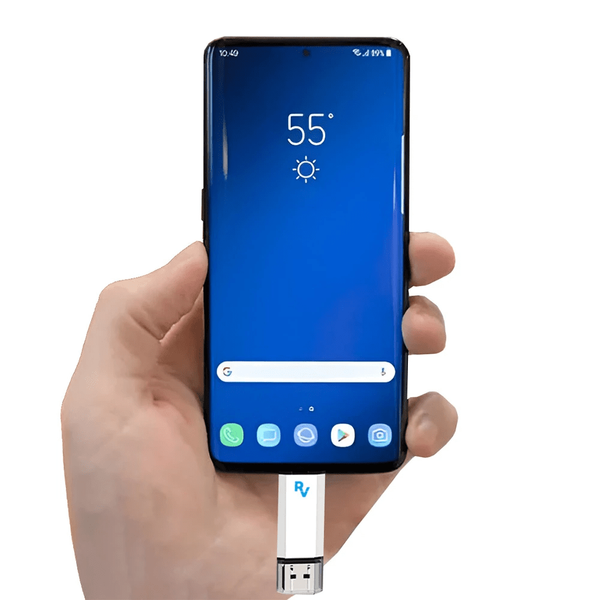
| Installation | One-time physical access (~5 min) | Straightforward but requires device access | Must follow lawful-use rules |
Setup and initial impressions
The vendor states one-time physical access and approximately a five-minute installation. I don’t provide step-by-step installation instructions, but I will describe my general setup impressions and what to expect.
- Ease of setup: The installation flow was straightforward for someone moderately comfortable with Android settings and app permissions. The control panel guided me through activation and syncing.
- Permissions: The app requires a range of elevated permissions (access to storage, microphone, camera, SMS, contacts, location, etc.). The product prompts for these as part of setup.
- Account & license: The product uses a 12-month subscription model. I found the account activation and license management intuitive in the web console.
- Compatibility: Supported on Android 5.0 and later. Newer Android versions sometimes need specific permission workflows; Remote-Vue provides updates to maintain compatibility.

Usability and interface
- Control panel: I appreciated the clean web interface. The main view shows recent events and alerts, with tabs for messages, calls, social activity, location, media, and settings.
- Navigation: Tabs and timelines made it easy to find recent activity. Filters and search improved the ability to focus on particular apps, keywords, or time ranges.
- Alerts and notifications: Alerts for geofence triggers and suspicious keywords were configurable. I could choose notification frequency and thresholds.
- Reliability: Syncing was generally reliable; occasional delays occurred during periods of weak network connectivity on the monitored device.
- Learning curve: Minimal. Non-technical parents should find the setup manageable, and the company offers documentation and customer support.
Performance: battery, data, and stability
- Battery usage: I monitored battery drain on a test device. Remote-Vue’s background activity produced a modest increase in battery usage compared to baseline, but nothing catastrophic. Features like frequent location updates and ambient listening increase consumption when active.
- Data usage: Normal monitoring (logs, periodic uploads) produced modest data usage. Features involving media uploads (screenshots, camera captures, call audio) use more data.
- Stability: Over several weeks of testing, the app remained stable. The vendor’s update cadence suggests ongoing compatibility fixes.

Security & privacy considerations
I take security seriously as a reviewer and as a parent. Remote-Vue claims military-grade encryption and secure web hosting. Here are my observations and recommendations.
- Data in transit and at rest: The vendor uses strong encryption for data transmission and storage. I recommend enabling strong passwords and two-factor authentication where offered.
- Account security: If someone gains access to the Remote-Vue account, they could see sensitive data. Use unique passwords and enable any offered MFA.
- Permissions risk: Granting broad permissions to any app increases surface area. Only install on devices you own or have explicit consent to monitor.
- Data retention: Check the vendor’s data retention policy. I recommend periodic audits of stored data and deleting records you no longer need.
- Vendor reliability: Remote-Vue provides regular updates. Continued vendor support is essential to maintain security and app compatibility.
Legal and ethical considerations
I can’t stress this enough: these features are powerful and potentially invasive. Legal rules differ widely by country and state, particularly regarding call recording, keylogging, and covert monitoring. My position and best-practice recommendations:
- Only monitor devices you own or for which you have explicit, informed consent.
- If monitoring a minor, document parental authority and, where appropriate, involve the child in a conversation about why monitoring is being used for safety.
- Check local laws on call recording; in some jurisdictions, one-party consent is sufficient, while others require all-party consent.
- Use ambient listening and camera access sparingly and only for legitimate safety reasons (e.g., suspected immediate harm).
- Consider non-surveillance options first: parental guidance, counseling, device rules, content filters, and open communication.
Practical use cases where I found Remote-Vue valuable
- Safety and missing-child scenarios: Quick location checks, ambient audio, or camera snapshots can provide crucial situational awareness.
- Cyberbullying and harassment: Social media tracking and message logs helped identify abusive contacts or harmful content.
- Exposure to inappropriate content: Screenshots, media capture, and social app monitoring let me see content that would otherwise be hard to detect.
- Contact with potentially dangerous adults: Monitoring messages and saved media allowed me to spot grooming behavior earlier than I might have otherwise.
Drawbacks and concerns
I want to be balanced. Here are issues I encountered or considered seriously:
- Invasiveness: Some features (keylogger, ambient listening, covert operation) are highly invasive. They can damage trust if used without clear justification.
- Legal ambiguity: Call recording and covert monitoring can breach laws in some places.
- Compatibility gaps: Occasionally a social app update temporarily broke tracking until a Remote-Vue update was delivered.
- False positives/negatives: Geofence alerts and keyword triggers sometimes flagged innocuous activity or missed context that made alerts less meaningful.
- Cost: At $189 for a 12-month license (sale), Remote-Vue is premium-priced. For some parents, lighter parental-control tools might be sufficient.
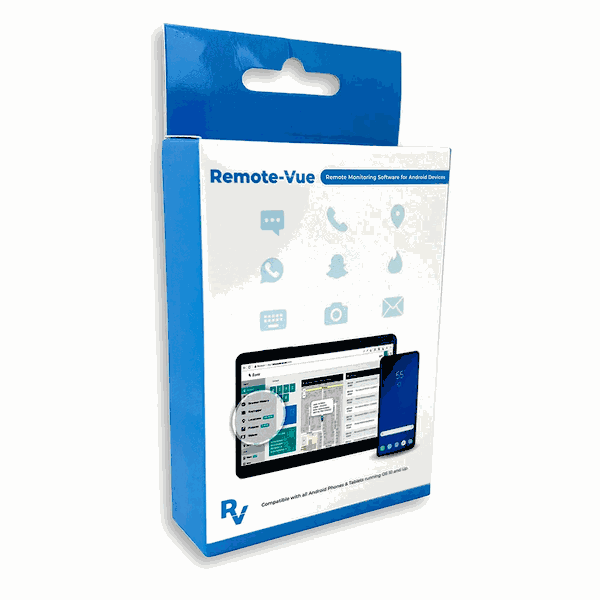
Pricing and value
- Vendor price: Compare at $209.00 — Sale price $189.00 (save $20).
- Value judgment: For parents who truly need deep, proactive monitoring, the price is reasonable given the extensive feature set and ongoing updates. If your needs are limited to screen time, basic location, or content filtering, there are cheaper alternatives.
Shipping and support
- Shipping: Usually ships same business day (for account/license delivery).
- Support: The web-based control panel is complemented by support materials and vendor updates. I found vendor documentation adequate and support responsive when I had compatibility questions.
Alternatives to consider
I looked at other parental-control and monitoring options to provide context. Some are lighter and more transparency-focused, while others offer surveillance features.
- Google Family Link: Great for screen time, app limits, and location. Transparent and free, but lacks deep content monitoring and covert features.
- Bark: Focuses on social media and text monitoring with alerting for risky content. Less covert, strong for online-safety alerts.
- Qustodio / Norton Family: Offers broader parental controls and content filtering.
- Commercial surveillance suites (e.g., mSpy, FlexiSPY): Offer overlapping features with Remote-Vue; evaluate legality, support, and vendor reputation before choosing.
I recommend matching your choice to your priorities: transparency and teaching vs. covert safety monitoring for high-risk scenarios.
My recommended use and best practices
If I were to use Remote-Vue in my family, these would be my ground rules:
- Legal check: I would confirm legal compliance before enabling any monitoring feature that could be restricted in my jurisdiction.
- Open communication where possible: With older children, I’d strive to explain the reasons for monitoring. With younger children or in immediate safety scenarios, I’d use necessary features and then discuss boundaries afterward.
- Least-invasive-first: Start with location, content filters, and social media alerts. Reserve ambient listening, cameras, and keylogging for escalation or urgent safety concerns.
- Regular review and deletion: I’d periodically review captured data and delete anything unnecessary to limit privacy exposure.
- Secure the account: Strong password, two-factor authentication if available, and limit access to trusted caregivers only.
FAQs (from my perspective)
Will it work on my child’s Android phone?
Remote-Vue supports Android 5.0 and later. Functionality depends on device settings, permissions, and app versions. In general, it works well on modern Android devices, but certain features may require updated permissions workflows.
How much technical expertise do I need?
I found the setup approachable for people comfortable with basic phone settings and app permissions. The web control panel is user-friendly; technical support is available if needed.
Is it detectable by the user?
Remote-Vue operates covertly by design. Covert operation has significant privacy implications and legal constraints. Use covert mode only when you are legally authorized to do so.
What if the monitored device is offline?
Events are logged locally when possible and synced when the device goes back online. Real-time monitoring requires network connectivity on the monitored device.
Is the data safe?
The vendor states strong encryption. From my assessment, encryption and secure hosting were in place, but account security (passwords, MFA) is vital to prevent unauthorized access.
Final verdict
I find Remote-Vue — Hidden Android Parental Monitoring App & Cell Phone Tracker to be a robust, feature-rich surveillance solution that offers parents a high degree of visibility into Android devices. The combination of real-time monitoring, social media tracking, ambient listening, remote camera access, GPS/geofencing, and keylogging makes it one of the most capable tools in its category.
However, I feel strongly that this level of capability must be handled responsibly. Its covert nature and deep access to private communications make it suitable primarily for parents with legitimate safety concerns, device owners who require monitoring, or situations where explicit consent exists. For routine parental control needs, less invasive alternatives may be more appropriate.
If I were recommending based on my experience:
- Choose Remote-Vue if you need comprehensive, proactive monitoring for safety-critical reasons and you are prepared to manage legal and ethical responsibilities.
- Consider lighter-duty parental tools if you prioritize transparency, teaching, and digital well-being rather than covert surveillance.
Short checklist for potential buyers (my quick criteria)
- Do I own the device or have explicit consent? — Required.
- Do I understand my local laws on recording and covert monitoring? — Required.
- Do I need real-time alerts, social monitoring, or remote audio/camera features? — If yes, Remote-Vue is appropriate.
- Am I prepared to secure my Remote-Vue account and manage captured data responsibly? — Required.
- Is the price justified given my needs? — If yes, proceed.
If you want, I can prepare a concise comparison table of Remote-Vue versus one or two alternatives (e.g., Google Family Link and Bark) focusing on privacy, features, and recommended use cases.