Have you ever wished you could capture every special moment in your life without the hassle of setting up a camera?

The Innovative Desk Lamp Camera
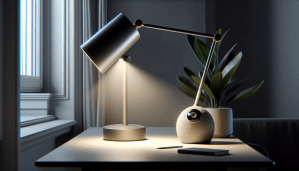
Imagine a device that seamlessly blends into your lifestyle, serving as both a functional desk lamp and a powerful camera. The desk lamp camera combines utility with modern technology, allowing you to document your experiences without interrupting the flow of life.
What is a Desk Lamp Camera?
A desk lamp camera is a unique gadget that merges the practicality of a lamp with the advanced features of a security camera. It typically features a sleek design, making it a stylish addition to your workspace or home. The built-in camera can serve various purposes—from monitoring your home to capturing candid moments as they happen.
The Benefits of Using a Desk Lamp Camera
Convenience
Having a camera discreetly integrated into a lamp means you can take pictures or videos without drawing attention to yourself. This is particularly handy for capturing natural moments with family or friends, as they’ll be unaware of your device.
Dual Functionality
The desk lamp camera serves two main functions: illumination and surveillance. This means you won’t need to invest in two separate pieces of equipment, saving you money and space.
Advanced Technology
Most desk lamp cameras are equipped with high-definition cameras and smart features. These can include motion detection, night vision, and even two-way audio. Such technology allows you to monitor your space at all hours and maintain communication with loved ones.
Enhanced Security
In addition to capturing moments, a desk lamp camera also acts as a security device. This dual-purpose nature can give you peace of mind, knowing you can keep an eye on your home or office without the bulk of traditional security systems.
How Desk Lamp Cameras Work
Now that you understand what a desk lamp camera is and its benefits, let’s delve into how it operates.
Basic Components of a Desk Lamp Camera
- Camera Module: The heart of the device, this part captures visual images.
- Lighting Fixture: This is the part you’ll use to brighten your space.
- Microphone and Speaker: Enables audio recording and two-way communication.
- Connectivity: Most cameras connect to your home Wi-Fi network for real-time viewing.
- Storage: Some have built-in storage, while others require cloud subscriptions.
Setup Process
Setting up a desk lamp camera is usually straightforward:
- Placement: Choose a suitable location where it can capture the areas you want to monitor.
- Power Connection: Plug it into a power source as per the manufacturer’s guidelines.
- App Setup: Most desk lamp cameras come with a mobile app for configuration. Download it, create an account, and follow the prompts.
- Wi-Fi Connection: Connect the device to your Wi-Fi network for remote access.
- Testing: After setup, take a test shot or video to ensure everything is functioning correctly.
Common Features
When choosing a desk lamp camera, you might consider some of the following features:
| Feature | Description |
|---|---|
| HD Video | Captures high-resolution images and videos. |
| Motion Detection | Alerts you when movement is detected. |
| Night Vision | Enables recording in low-light conditions. |
| Cloud Storage | Saves your footage for easy retrieval. |
| Remote Access | View live feeds from your smartphone. |
| Two-Way Audio | Communicate with others through the device. |
Using Your Desk Lamp Camera
Once you’ve set up your desk lamp camera, how can you make the most out of it?
Capturing Candid Moments
The discreet nature of the camera allows you to capture spontaneous moments. Whether it’s a family gathering or a casual lunch with friends, simply turn on the camera and let it do the work.
Monitoring Your Space
For those who travel frequently, your desk lamp camera can serve as a reliable surveillance tool. You’ll be able to check in on your pets, children, or home while you’re away. With features like motion detection, you’ll receive alerts if anything unusual happens.
Taking Great Photos
Utilize the high-definition capabilities to take professional-looking pictures. Adjust the lighting through the lamp’s features to ensure you capture the best light for any situation.
Creative Uses
Here are several creative ways you can use your desk lamp camera:
-
Time-Lapse Photography: Set the camera to take regular intervals of photos and compile them into a time-lapse video. This works great for observing changes in your workspace.
-
Virtual Meetings: Utilize the camera for online meetings or streaming sessions, ensuring you look your best in any lighting condition.
-
Artistic Shots: Experiment with the light and angles for artistic shots. The lamp can create unique shadows and highlights.
Maintaining Your Desk Lamp Camera
Just like any device, your desk lamp camera requires regular maintenance to ensure it continues to function optimally.
Regular Checks
Perform regular checks to ensure the lens is clean and free from dust. A smudged lens can affect the quality of your recordings.
Keep Software Updated
Manufacturers often release updates that improve functionality or fix bugs. Make it a habit to check for updates through the app.
Storage Management
If your device uses cloud storage or an SD card, occasionally review your footage to delete unnecessary files. This will free up storage space and enhance performance.
Battery Care
If your desk lamp camera is battery-operated, ensure you charge it regularly to avoid interruptions during usage.
Safety and Privacy Considerations
While desk lamp cameras provide numerous advantages, it’s essential to be aware of safety and privacy issues.
Secure Your Connection
Ensure that your Wi-Fi network is secure. Use strong passwords and enable encryption to ward off unauthorized access.
Inform Others
If you plan to use the camera in shared spaces, inform family members or guests. Transparency is crucial in maintaining trust and protecting privacy.
Follow Guidelines
Always adhere to local laws and regulations regarding surveillance. Familiarize yourself with the legal obligations surrounding camera usage in your area.
The Future of Desk Lamp Cameras
As technology progresses, we can expect even more advanced features in desk lamp cameras. Future trends may include
AI Integration
Artificial Intelligence could enhance object recognition and automated alerts, ensuring you only receive notifications for significant events.
Improved Video Quality
Future models may feature even higher resolution cameras, offering crystal-clear images. You might also find enhancements in night vision for clearer footage in low-light conditions.
Smart Home Integration
Desk lamp cameras may become compatible with other smart home devices, enabling seamless automation. Imagine using voice commands to operate your camera through a smart assistant.
Choosing the Right Desk Lamp Camera
With various models available, selecting the perfect desk lamp camera can feel overwhelming. Here are some key factors to consider:
Price Range
Desk lamp cameras vary in price, so determine a budget before you start shopping.
Brand Reputation
Consider well-reviewed brands known for quality and customer service.
Special Features
Identify which features are essential for you. Do you need night vision or two-way audio? Make a list of must-have functionalities.
User Reviews
Reading reviews can be incredibly valuable. They offer insights into user experiences, reliability, and overall satisfaction.
Conclusion
Investing in a desk lamp camera can enhance your daily life by allowing you to capture memories while also providing security. Whether you’re documenting everyday moments or keeping an eye on your space, this innovative device serves a dual purpose, blending seamlessly with your environment.
If you’ve been searching for an efficient way to document significant moments in your life without the burden of additional equipment, the desk lamp camera could be the perfect addition to your home or office. With vast functionality, ease of use, and an attractive aesthetic, it might just become your favorite device.
Now that you know more about desk lamp cameras, you’re equipped to make an informed decision about whether this innovative piece of technology is right for you. Happy capturing!