
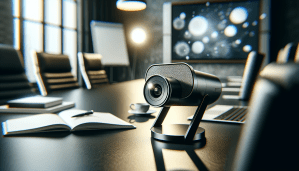
Have you ever wondered what the future holds for video conferencing technology? The way we communicate, collaborate, and connect has evolved dramatically in recent years, and speaker camera innovations are at the forefront of this transformation. As remote work becomes more commonplace and digital interactions increase, understanding the advancements in speaker cameras can significantly enhance your video conferencing experience.

Understanding Speaker Cameras
Speaker cameras are essential tools in a video conferencing setup. Unlike traditional webcams, these devices are designed to focus on the speaker in a meeting room, ensuring that viewers feel more connected and engaged. They often come equipped with advanced technologies that automatically adjust the framing and focus, making the person speaking the center of attention.
Why Speaker Cameras Matter
You might be wondering why these innovations are crucial for effective communication. The answer lies in the difference they can make in maintaining engagement. When the speaker is clearly visible and appropriately framed, participants are less likely to feel disconnected. This can lead to better retention of information, increased participation, and a more fruitful discussion.
The Rise of Intelligent Cameras
One of the most exciting developments in speaker camera technology is the rise of intelligent cameras. These cameras use artificial intelligence (AI) to enhance user experience, allowing for dynamic adjustments based on the meeting environment.
Features of Intelligent Cameras
-
Automatic Framing: Intelligent cameras can detect where the speaker is located and adjust the framing accordingly. This feature ensures that regardless of how a person moves, they’ll always be visible to the audience.
-
Voice Activation: Some cameras can identify who is speaking and adjust the focus accordingly. This means that whenever you speak, the camera will zoom in on you, making it feel like a one-on-one conversation.
-
Background Adaptation: Advanced speaker cameras can also blur or filter the background, ensuring that viewers remain focused on the speaker instead of any distractions in the background.
The Impact of 4K Resolution
As video quality improves, so too does the experience of video conferencing. The introduction of 4K resolution in speaker cameras provides users with high-definition video clarity, making every detail visible.
Benefits of 4K in Video Conferencing
-
Increased Clarity: With 4K resolution, you can see facial expressions and body language much more clearly. This can enhance understanding and empathy during discussions.
-
Professionalism: Using high-definition video can elevate your meetings, making them feel more professional and polished. This is particularly important for business meetings or client presentations.
-
Enhanced Collaboration: Whether you’re presenting a project or collaborating on ideas, clear visuals can foster better collaboration and creativity.
Integrating Speaker Cameras with Collaboration Tools
The integration of speaker cameras with popular collaboration tools is another exciting trend. As you use video conferencing platforms like Zoom, Microsoft Teams, and Google Meet, having a well-integrated camera can streamline your workflow.
Seamless Connectivity
-
Plug-and-Play Functionality: Modern speaker cameras often come equipped with plug-and-play capabilities, meaning you can easily connect them to your computer or device without the hassle of complicated setups.
-
API Integration: Some cameras provide APIs that allow for deeper integration with software tools, enabling custom functionalities that can enhance user experience.
The Role of 360-Degree Cameras
In recent years, 360-degree cameras have gained popularity for video conferencing. These cameras provide an immersive experience that traditional options can’t match, capturing everything happening in a room.
Advantages of 360-Degree Cameras
-
Inclusivity: With a 360-degree camera, everyone in the meeting room can be seen, which is especially valuable for large groups. This inclusivity can lead to more participatory discussions.
-
Interactive Presentations: Imagine delivering a presentation where participants can look around the room based on their curiosity. This level of interaction can make meetings more engaging and enjoyable.
Future Trends in Speaker Camera Technology
As technology continues to evolve, you can expect several exciting trends to shape the future of speaker cameras and video conferencing as a whole.
Hybrid Meeting Solutions
As businesses continue to adopt hybrid models, the demand for speaker cameras that can accommodate both in-person and remote participants will grow. This can mean advanced tracking features that enable cameras to switch between speakers seamlessly, ensuring that everyone feels included.
Enhanced AI Capabilities
AI advancements are expected to continue to play a significant role in speaker camera technology. Future innovations may include even smarter cameras that can predict who will speak next based on conversation patterns or analyze audience engagement levels.
Collaboration with Augmented Reality (AR)
Imagine a meeting where you can bring in interactive 3D models into your video call. Collaborating with AR technology can enhance presentations and discussions, allowing for immersive experiences that traditional video calls lack.
Choosing the Right Speaker Camera for Your Needs
When shopping for a speaker camera, consider several factors to ensure you select the best option for your specific needs.
Key Features to Consider
| Feature | Importance |
|---|---|
| Resolution | Higher resolution offers better clarity. |
| Field of View | A wider field of view captures more participants. |
| Audio Quality | Ensure the camera has built-in, high-quality microphones. |
| Low Light Performance | Cameras that perform well in low light conditions can make a significant difference. |
| Price | Decide on your budget, balancing features and affordability. |
How to Assess Your Needs
-
Identify Use Cases: Think about the primary contexts in which you’ll use the camera. Is it for casual meetups, formal presentations, or client meetings?
-
Consider Room Size: If you’re using the camera in larger rooms, you might need a camera with a higher field of view or multiple cameras to capture the whole area effectively.
-
Prioritize Features: Consider which features are most important to you. For instance, if you frequently move around, automatic framing may be a necessity.
Setting Up Your Speaker Camera
Once you’ve selected your camera, setting it up correctly is key to maximizing its potential.
Best Practices for Setup
-
Positioning: Mount your camera at eye level to create a natural line of sight. This encourages a more engaging interaction during video calls.
-
Lighting: Ensure your setup has sufficient lighting. Soft, diffused light can reduce shadows and enhance video quality.
-
Background: Choose a clean, uncluttered background to maintain viewers’ focus on you. You can also consider using professional backdrops or virtual backgrounds if needed.
Testing Your Setup
Before jumping into an important meeting, take the time to test your setup.
-
Check Audio and Video Quality: Conduct a test call with a colleague to make sure everything is functioning as expected. Ensure the audio is clear and video is well-lit.
-
Adjust Camera Settings: Familiarize yourself with the camera’s settings, adjusting the resolution, focus, and any other features to fit your preferences.
-
Familiarize Yourself with Navigation: If your camera has advanced features (like smart framing), practice using them to feel comfortable during real meetings.
Addressing Security Concerns
As with any technology, security concerns are significant when using speaker cameras, especially in a professional setting.
Ensuring Data Privacy
-
Use Secure Networks: Always connect your camera to secure and trusted networks. Public Wi-Fi can expose your devices to potential threats.
-
Regular Updates: Keep the camera’s firmware updated to protect against any security vulnerabilities.
-
Limit Access: Ensure only authorized individuals can access your camera settings.
Handling Recording and Streaming
If you plan to record meetings, make sure you have permissions from all participants. Be transparent about how recordings will be used and stored.
Enhancing Your Video Conferencing Etiquette
How you use your speaker camera can impact the overall tone and effectiveness of your meetings. Here are a few etiquette tips.
Be Mindful of Background Noise
Whether you’re in a shared space or working from home, minimizing background noise is vital. Consider using headsets with noise-canceling features for improved sound quality.
Maintain Eye Contact
Try to look directly at the camera when speaking, just as you would when addressing a person face-to-face. This creates a stronger connection with your virtual audience.
Engage Your Audience
Encourage participation by inviting questions, feedback, and comments. This not only enhances interaction but also fosters a more inclusive environment.
Conclusion: The Path Ahead
The future of video conferencing, particularly with innovations in speaker cameras, looks promising. As technology continues to advance, you can expect even more sophisticated features that enhance user experience and interactivity. Embracing these innovations can help you stay connected, engaged, and productive in a virtual landscape that, while physically distant, continues to bring us closer than ever. By investing in the right technology and adopting effective communication practices, you can elevate your video conferencing experience to new heights.